16x Prompt vs Gorilla Terminal
Explore the showdown between 16x Prompt vs Gorilla Terminal and find out which AI Code Assistant tool wins. We analyze upvotes, features, reviews, pricing, alternatives, and more.
When comparing 16x Prompt and Gorilla Terminal, which one rises above the other?
When we contrast 16x Prompt with Gorilla Terminal, both of which are exceptional AI-operated code assistant tools, and place them side by side, we can spot several crucial similarities and divergences. Interestingly, both tools have managed to secure the same number of upvotes. Join the aitools.fyi users in deciding the winner by casting your vote.
Does the result make you go "hmm"? Cast your vote and turn that frown upside down!
16x Prompt

What is 16x Prompt ?
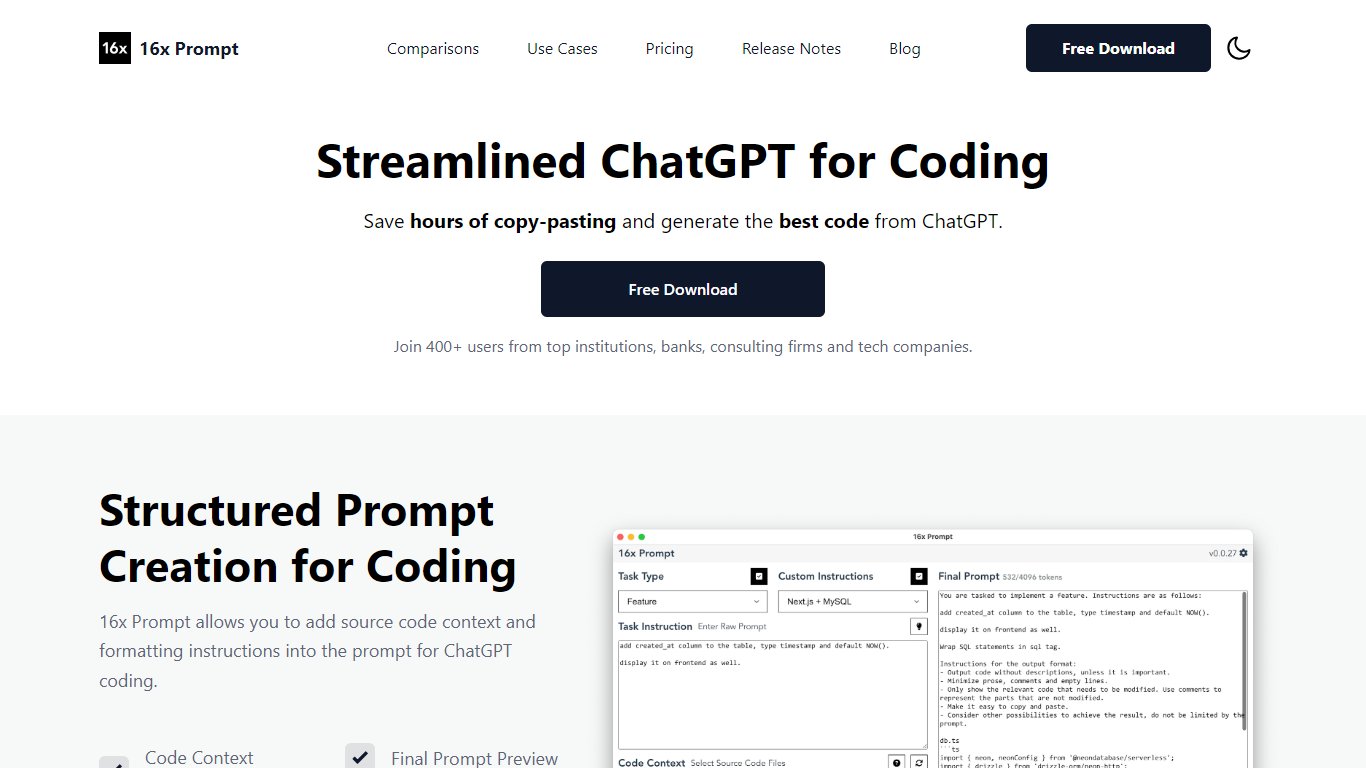
16x Prompt is a desktop app for developers who want more control over AI-assisted coding. You select source files, add task instructions and formatting rules, and the app assembles an optimized prompt with the right context for complex work on existing codebases.
You can copy the final prompt into ChatGPT, Claude, or any LLM, or send it directly through API integrations using your own keys. Supported providers include OpenAI, Anthropic Claude, Google Gemini, DeepSeek, OpenRouter, Ollama, and Azure OpenAI. The app also includes code edit mode with visual diffs, automatic backups, and side-by-side model comparison.
Prompt generation runs locally on your machine. Workspaces let you organize multiple repositories, save reusable task templates, and track token limits so prompts stay within model constraints. Available for macOS, Windows, and Linux.
Gorilla Terminal

What is Gorilla Terminal?
Gorilla Terminal pulls stock data, SEC filings, macro indicators, and earnings call transcripts into one terminal-style dashboard in your browser. Search by ticker and you get charts, quarterly reports, insider trades, Twitter sentiment, and live futures without hopping between Bloomberg tabs and scattered finance sites.
Most research terminals either dump raw data tables or lean on generic summaries. Gorilla Terminal focuses on earnings calls: it runs sentiment analysis on what executives actually said, flags positive and negative statements, and lets you filter by quarter. That transcript-first angle is the trade-off. You get deeper call breakdowns than a charting site, but the product is built for equity research rather than crypto or forex.
Portfolio managers, solo investors, and finance students use this investment research tool to prep for earnings season, scan sector averages, and stress-test holdings with value-at-risk and regression tools. The macro panel covers CPI, unemployment, retail sales, and consumer sentiment in one click.
16x Prompt Upvotes
Gorilla Terminal Upvotes
16x Prompt Top Features
Select source files and task instructions to build structured coding prompts
Copy prompts to any LLM or send via BYOK API to OpenAI, Claude, Gemini, and more
Apply AI code edits with visual diffs, automatic backups, and rollback
Compare responses from different LLM models side by side
Save reusable task instructions and custom formatting rules per tech stack
Organize multiple repositories in workspaces with token limit tracking
Runs locally on macOS, Windows, and Linux with dark mode support
Gorilla Terminal Top Features
Earnings call transcripts with AI sentiment scoring and positive/negative statement filters per quarter
Macro dashboard covering CPI, unemployment, retail sales, and consumer sentiment in one view
Stock search returns charts, 10-Ks, 10-Qs, insider buying, and Twitter sentiment on one page
Value-at-risk and regression analysis for portfolio risk modeling
Industry average metrics across revenue growth, margins, and tax rates by sector
Pro plan at $29 per month, down from a listed $49 per month on the pricing page
7-day pass at $9.99 for short-term access without a monthly commitment
16x Prompt Category
- Code Assistant
Gorilla Terminal Category
- Code Assistant
16x Prompt Pricing Type
- Freemium
Gorilla Terminal Pricing Type
- Paid