Copilot Chat vs Gorilla Terminal
In the face-off between Copilot Chat vs Gorilla Terminal, which AI Code Assistant tool takes the crown? We scrutinize features, alternatives, upvotes, reviews, pricing, and more.
When we put Copilot Chat and Gorilla Terminal head to head, which one emerges as the victor?
If we were to analyze Copilot Chat and Gorilla Terminal, both of which are AI-powered code assistant tools, what would we find? The upvote count reveals a draw, with both tools earning the same number of upvotes. You can help us determine the winner by casting your vote and tipping the scales in favor of one of the tools.
Not your cup of tea? Upvote your preferred tool and stir things up!
Copilot Chat

What is Copilot Chat?
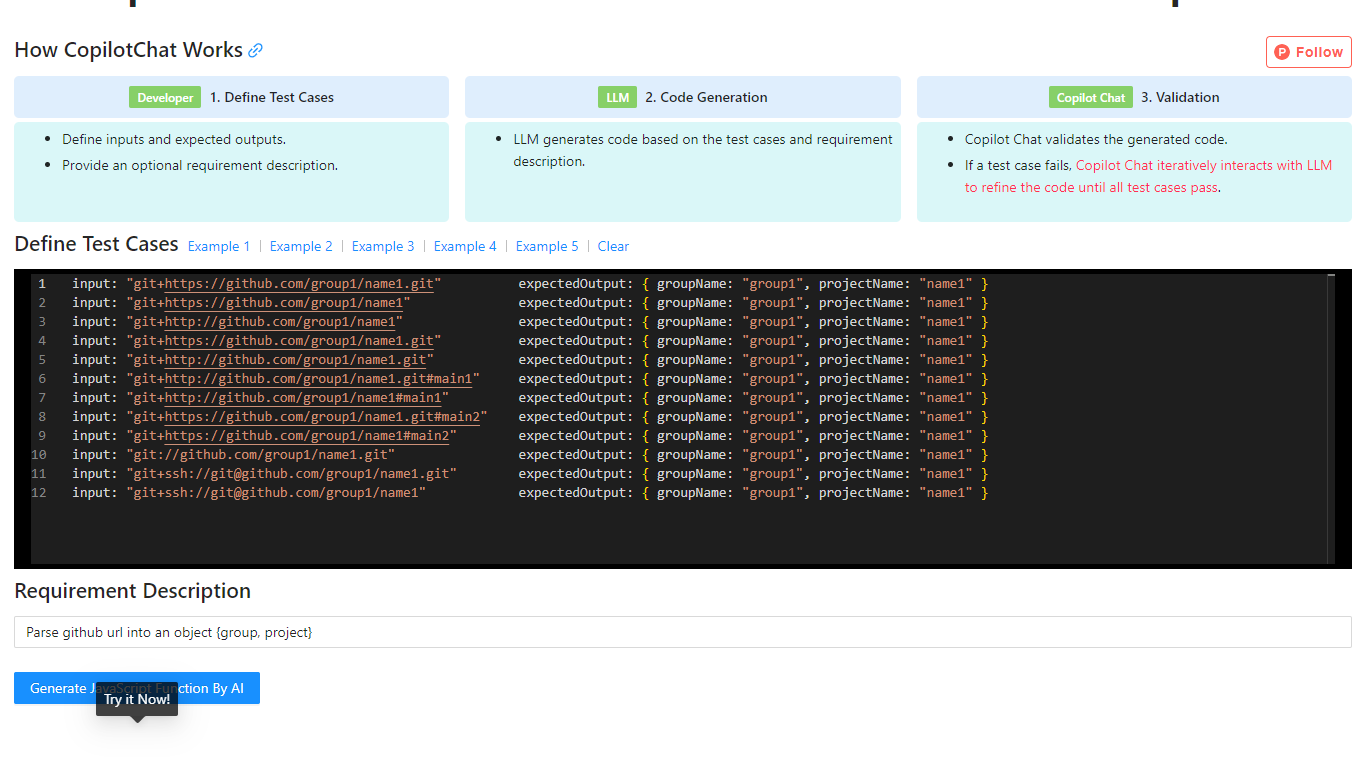
Copilot Chat is a test-driven code generation tool that helps developers produce JavaScript functions from input-output test cases. You define inputs, expected outputs, and an optional requirement description, then the tool uses an LLM to generate code and validate it against your tests.
If a test fails, Copilot Chat iteratively refines the generated code with the model until every case passes. The site includes worked examples for tasks like parsing GitHub URLs, parsing CSS color strings, and capitalizing words in a string.
The workflow is inspired by test-driven development and flow-engineering ideas similar to TypeChat and AlphaCodium, focusing on repeatable validation instead of one-shot prompt output.
Gorilla Terminal

What is Gorilla Terminal?
Gorilla Terminal pulls stock data, SEC filings, macro indicators, and earnings call transcripts into one terminal-style dashboard in your browser. Search by ticker and you get charts, quarterly reports, insider trades, Twitter sentiment, and live futures without hopping between Bloomberg tabs and scattered finance sites.
Most research terminals either dump raw data tables or lean on generic summaries. Gorilla Terminal focuses on earnings calls: it runs sentiment analysis on what executives actually said, flags positive and negative statements, and lets you filter by quarter. That transcript-first angle is the trade-off. You get deeper call breakdowns than a charting site, but the product is built for equity research rather than crypto or forex.
Portfolio managers, solo investors, and finance students use this investment research tool to prep for earnings season, scan sector averages, and stress-test holdings with value-at-risk and regression tools. The macro panel covers CPI, unemployment, retail sales, and consumer sentiment in one click.
Copilot Chat Upvotes
Gorilla Terminal Upvotes
Copilot Chat Top Features
Define input and expected output test cases before code is generated
Uses an LLM to generate JavaScript based on your tests and requirement notes
Automatically validates generated code against every test case
Iteratively refines failed outputs until all tests pass
Includes built-in examples for Git URL parsing, CSS color parsing, and string manipulation
Gorilla Terminal Top Features
Earnings call transcripts with AI sentiment scoring and positive/negative statement filters per quarter
Macro dashboard covering CPI, unemployment, retail sales, and consumer sentiment in one view
Stock search returns charts, 10-Ks, 10-Qs, insider buying, and Twitter sentiment on one page
Value-at-risk and regression analysis for portfolio risk modeling
Industry average metrics across revenue growth, margins, and tax rates by sector
Pro plan at $29 per month, down from a listed $49 per month on the pricing page
7-day pass at $9.99 for short-term access without a monthly commitment
Copilot Chat Category
- Code Assistant
Gorilla Terminal Category
- Code Assistant
Copilot Chat Pricing Type
- Free
Gorilla Terminal Pricing Type
- Paid