Lifestack vs Finito
In the contest of Lifestack vs Finito, which AI Productivity tool is the champion? We evaluate pricing, alternatives, upvotes, features, reviews, and more.
If you had to choose between Lifestack and Finito, which one would you go for?
When we examine Lifestack and Finito, both of which are AI-enabled productivity tools, what unique characteristics do we discover? With more upvotes, Finito is the preferred choice. Finito has garnered 8 upvotes, and Lifestack has garnered 6 upvotes.
Not your cup of tea? Upvote your preferred tool and stir things up!
Lifestack


What is Lifestack?
Lifestack is a productivity planner that builds your daily schedule around sleep, recovery, and focus instead of empty calendar blocks. It reads wearable and health signals, maps energy peaks and calm periods across your day, and drafts a schedule that places demanding work when you can actually focus.
Most calendar apps treat you like a task executor with unlimited stamina. Lifestack treats energy, meals, and rest as first-class inputs, overlaying focus and calm zones on your calendar so you see when deep work fits and when lighter tasks make sense. That body-first layer is the trade-off: it is narrower than a general project manager, but it connects health data to scheduling decisions most planners ignore.
The product suits professionals juggling meetings and deep work, ADHD users who need external structure around energy swings, and anyone syncing tasks from tools like Trello while trying to protect sleep and meal timing. Apps run on iPhone, Mac, Android, and Chrome, with a desktop Mac download and browser extension for calendar access.
Finito
What is Finito?
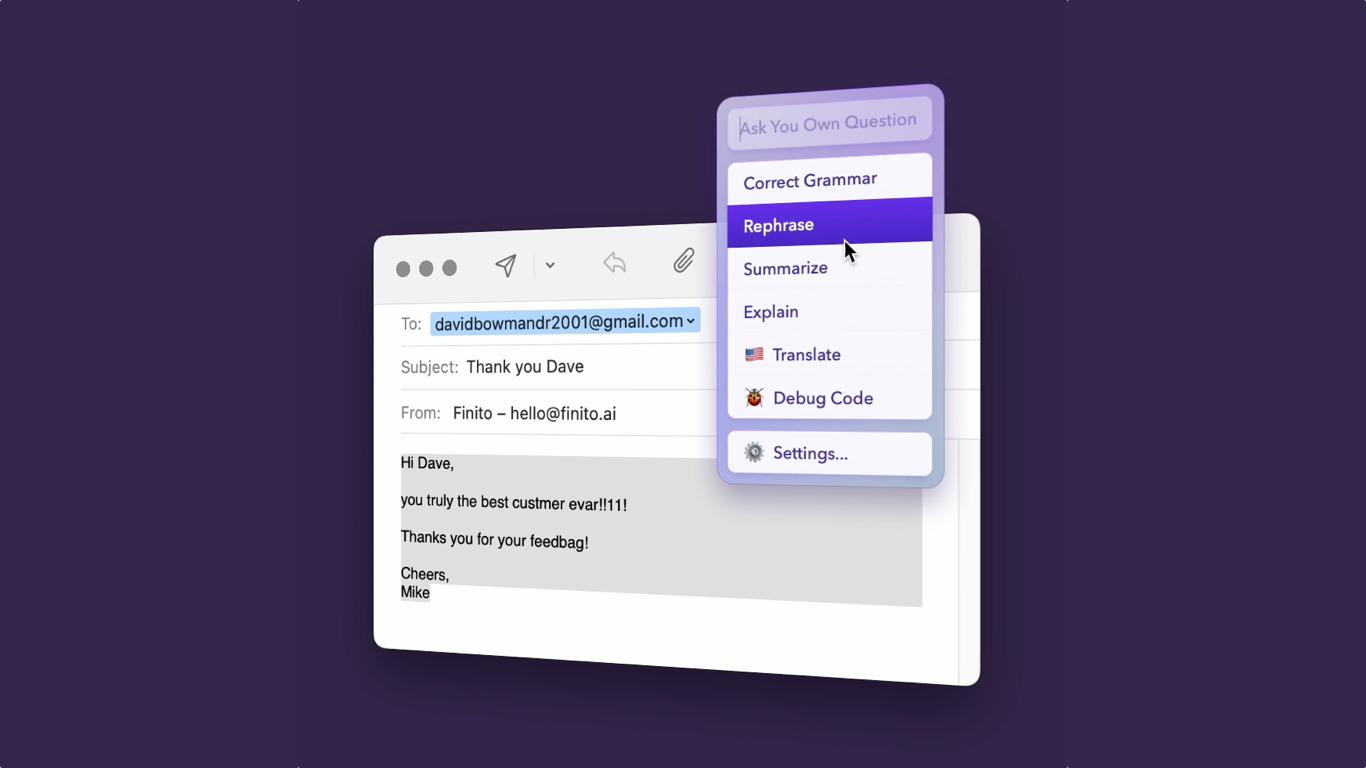
Finito puts ChatGPT inside any Mac or Windows program for quick text edits. Select copy in an email client, browser, chat app, or design tool, press the Control key, and a command list appears to fix grammar, rewrite copy, translate, brainstorm, or answer questions. You can replace the selection in place or ask Finito follow-up questions from the same overlay.
Compared with copying text into a ChatGPT tab, Finito stays inside the app you already have open. It runs through Mike Antonic's server to the ChatGPT API, counts word usage against your plan, and supports custom commands with your own shortcuts. That focus on in-context edits trades the flexibility of a full chat UI for speed when you only need a quick rewrite.
Writers, support reps, and founders on Mac or Windows use Finito for proofreading messages, polishing docs, and translating snippets without switching windows. The demo includes about 4,000 total words, while paid licenses include roughly 40,000 words per month with optional limit increases by emailing [email protected].
Lifestack Upvotes
Finito Upvotes
Lifestack Top Features
Maps Energy Zones on your calendar so focus work lands during peak energy periods
Pulls wearable and Apple Health data into the same view as your schedule
Syncs tasks from third-party tools such as Trello alongside calendar events
Plans meals and sleep blocks around the day's meetings and task load
Chat copilot answers daily planning questions with your schedule in context
Runs on iPhone, Mac, Android, and Chrome with unlimited calendars and tasks on paid plans
Used by 30,000+ users per the Lifestack homepage
Finito Top Features
Summon Finito on selected text with the Control key in any Mac or Windows app
Built-in commands for grammar fixes, rewrites, translations, ideas, and Q&A via ChatGPT
Replace selected text in place with the AI-generated version from the overlay
Create custom commands and keyboard shortcuts inside Finito settings
Demo tier includes about 4,000 total words before purchase is required
Paid plans include about 40,000 words per month with monthly reset limits
Lifestack Category
- Productivity
Finito Category
- Productivity
Lifestack Pricing Type
- Paid
Finito Pricing Type
- Freemium