Lifestack vs Rotime
In the contest of Lifestack vs Rotime, which AI Productivity tool is the champion? We evaluate pricing, alternatives, upvotes, features, reviews, and more.
If you had to choose between Lifestack and Rotime, which one would you go for?
When we examine Lifestack and Rotime, both of which are AI-enabled productivity tools, what unique characteristics do we discover? Neither tool takes the lead, as they both have the same upvote count. You can help us determine the winner by casting your vote and tipping the scales in favor of one of the tools.
Disagree with the result? Upvote your favorite tool and help it win!
Lifestack


What is Lifestack?
Lifestack is a productivity planner that builds your daily schedule around sleep, recovery, and focus instead of empty calendar blocks. It reads wearable and health signals, maps energy peaks and calm periods across your day, and drafts a schedule that places demanding work when you can actually focus.
Most calendar apps treat you like a task executor with unlimited stamina. Lifestack treats energy, meals, and rest as first-class inputs, overlaying focus and calm zones on your calendar so you see when deep work fits and when lighter tasks make sense. That body-first layer is the trade-off: it is narrower than a general project manager, but it connects health data to scheduling decisions most planners ignore.
The product suits professionals juggling meetings and deep work, ADHD users who need external structure around energy swings, and anyone syncing tasks from tools like Trello while trying to protect sleep and meal timing. Apps run on iPhone, Mac, Android, and Chrome, with a desktop Mac download and browser extension for calendar access.
Rotime
What is Rotime?
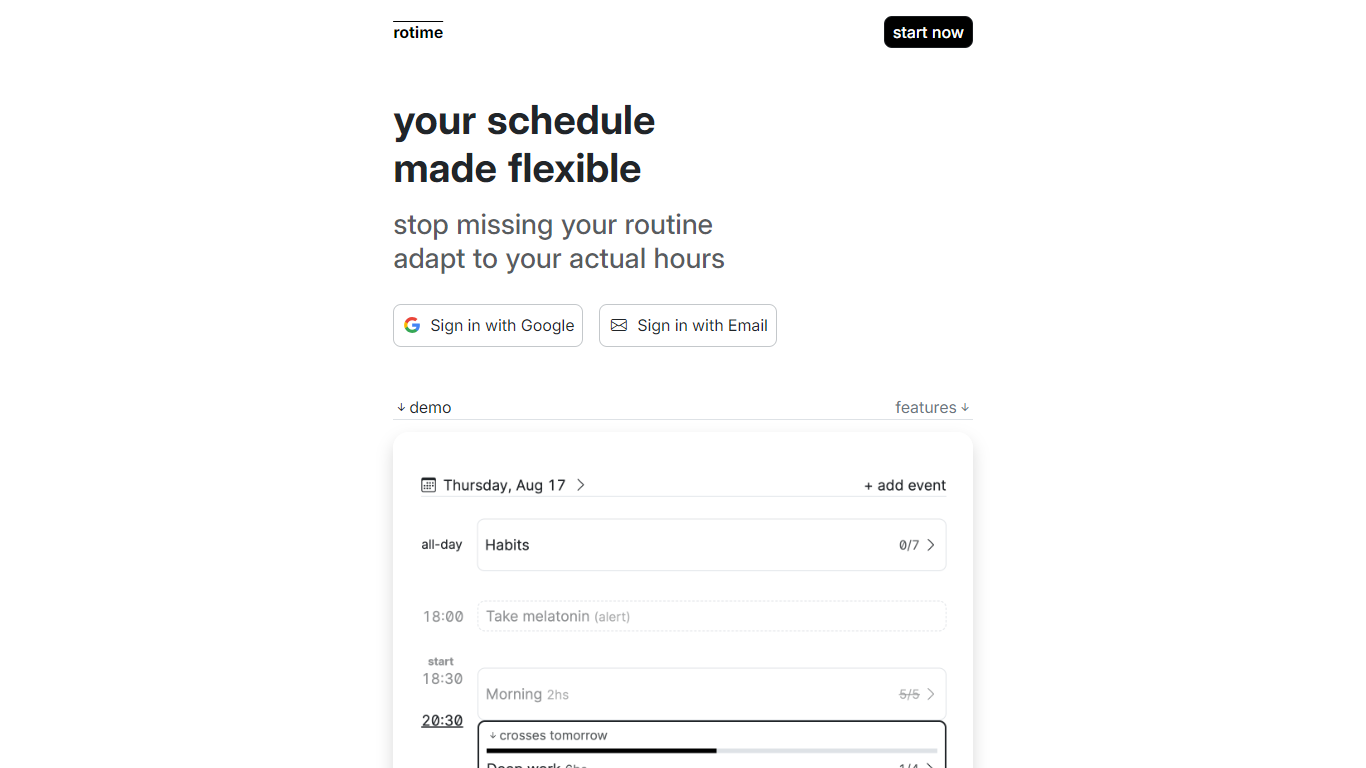
Rotime is a dynamic and versatile platform designed to revolutionize how you manage your daily schedule. It offers features that allow users to create events with flexible start and end times, set time-fixed alerts for essential appointments, and mark all-day events for days that require special attention.
Rotime provides routine templates which can be reused for recurring events and tasks, ensuring you maintain productivity without the stress of constant planning. The start time of your day can be manually set or automatically detected by the application, catering to the spontaneous changes in your routine.
One of the standout features is the timeboard, which presents a comprehensive overview of your routine, enabling you to visualize and organize your day efficiently. The focus-aware user interface is another ingenious addition that minimizes distractions by emphasizing the current event and dimming the rest, allowing you to focus on the task at hand. Along with all these features, Rotime includes a checklist feature to create tasks within events that can be marked as completed or skipped, ensuring you stay on track throughout the day.
Furthermore, Rotime acknowledges the importance of historical data, providing access to all past dates and the option to export your personal data for record-keeping or analysis. It also seamlessly adapts to the dark/light mode based on your device or operating system theme, ensuring comfort during usage at any hour.
Rotime's goal is simple yet impactful – to offer you a schedule that molds to your life, not the other way around, ensuring you never miss out on your routine again by adapting to your actual waking hours.
Lifestack Upvotes
Rotime Upvotes
Lifestack Top Features
Maps Energy Zones on your calendar so focus work lands during peak energy periods
Pulls wearable and Apple Health data into the same view as your schedule
Syncs tasks from third-party tools such as Trello alongside calendar events
Plans meals and sleep blocks around the day's meetings and task load
Chat copilot answers daily planning questions with your schedule in context
Runs on iPhone, Mac, Android, and Chrome with unlimited calendars and tasks on paid plans
Used by 30,000+ users per the Lifestack homepage
Rotime Top Features
Flexible Event Scheduling: Create events with adjustable start and end times.
Alerts for Appointments: Set timely alerts for critical, time-sensitive engagements.
All-Day Events: Designate full days for holidays, theming, or habits.
Routine Templates: Access reusable blueprints for frequent tasks and events.
Focus-Aware Interface: Highlight the current event while keeping others in the backdrop to reduce distractions.
Lifestack Category
- Productivity
Rotime Category
- Productivity
Lifestack Pricing Type
- Paid
Rotime Pricing Type
- Freemium