ListenRobo vs Clipchamp
In the clash of ListenRobo vs Clipchamp, which AI Video Editing tool emerges victorious? We assess reviews, pricing, alternatives, features, upvotes, and more.
When we put ListenRobo and Clipchamp head to head, which one emerges as the victor?
Let's take a closer look at ListenRobo and Clipchamp, both of which are AI-driven video editing tools, and see what sets them apart. Both tools have received the same number of upvotes from aitools.fyi users. Be a part of the decision-making process. Your vote could determine the winner.
Think we got it wrong? Cast your vote and show us who's boss!
ListenRobo
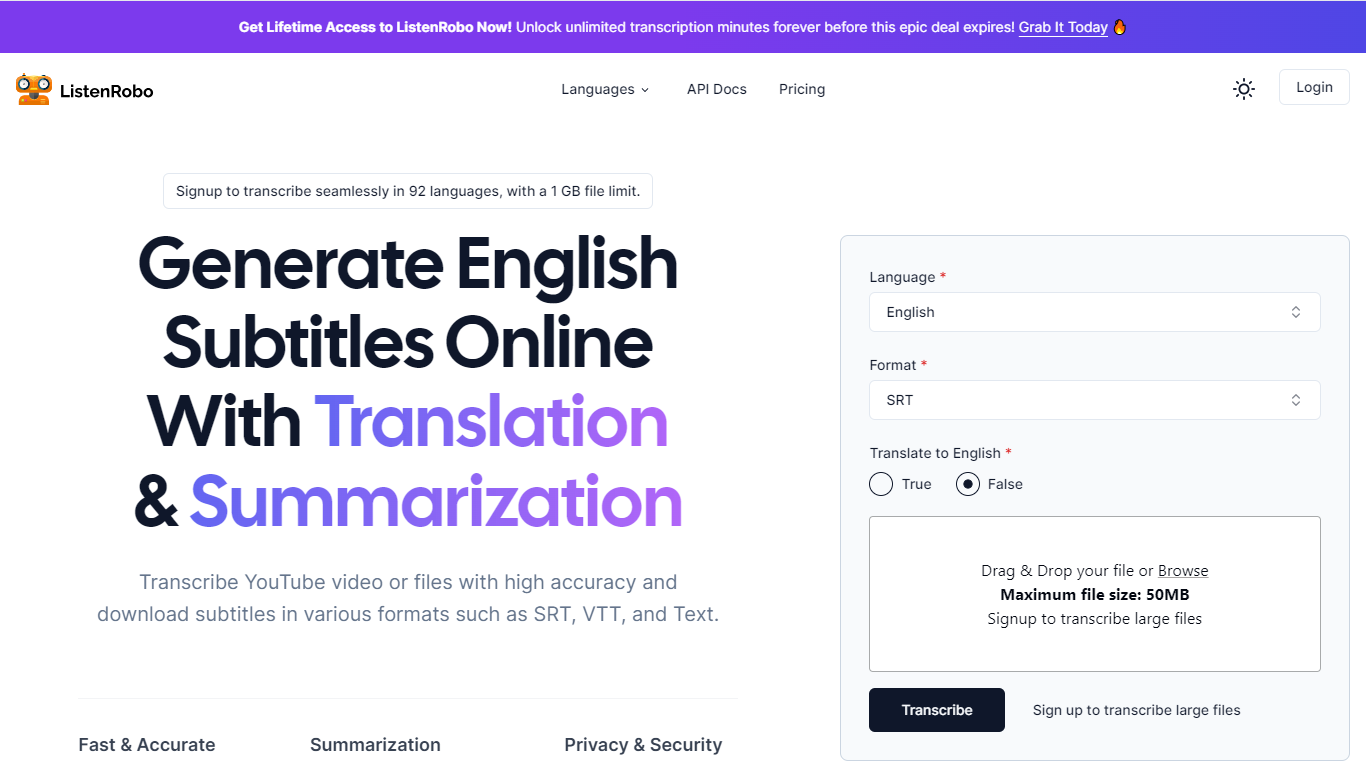

What is ListenRobo?
ListenRobo is your go-to platform for transcribing audio and video content into text and creating subtitles with ease. Built for both personal and professional use, ListenRobo harnesses advanced speech-to-text technology to deliver accurate transcriptions in a variety of formats, including TXT, SRT, and VTT.
This user-friendly service offers an impressive range of features such as subtitle downloading, multi-language support for transcription in 92 languages, and secure data handling with AES encryption. Moreover, it includes a summarization tool to distill long-form content into concise summaries, and a translation option to help you reach a global audience.
Whether for SEO optimization, enhancing content accessibility, boosting engagement, or supporting education, ListenRobo provides a reliable and efficient transcription solution.
Clipchamp

What is Clipchamp?
Clipchamp is a versatile video editing platform that empowers users to create stunning videos with ease. Whether you're editing on a browser, using the Windows app, or on mobile, Clipchamp simplifies the process with its smart tools and royalty-free content. It's ideal for everything from YouTube and TikTok videos to promo videos and Facebook video ads. Notable for its AI video editing capabilities, such as autocaptions and text-to-speech, Clipchamp also offers features like green screen effects, video overlays, and even speaker coaching. It ensures that your video fits any platform perfectly by allowing you to resize and transform your video with stylish elements. For business, education, or fun, Clipchamp is the way to go for creating high-quality videos without watermarks in up to 4K resolution. Now a part of Microsoft, this tool assures a smooth experience for all your video creation needs.
ListenRobo Upvotes
Clipchamp Upvotes
ListenRobo Top Features
Fast & Accurate: Delivers rapid transcription services without compromising on accuracy.
Supports 92 Languages: Capable of transcribing audio in a diverse range of languages for broader accessibility.
Privacy & Security: Ensures all data is stored securely with AES encryption, protecting user privacy.
Translation Option: Provides translation of transcripts into English, widening accessibility for global audiences.
Subtitles Downloader: Offers the ability to download subtitles in multiple formats like SRT and VTT for easy integration into various media platforms.
Clipchamp Top Features
Autocaptions: Automatically generate accurate captions in over 140 languages using advanced speech-to-text technology.
Text to Speech: Easily convert text into natural-sounding speech in various languages and voices.
Resize Video: Adjust the aspect ratio of your videos to fit different platforms with customizable background colors and blur effects.
Speaker Coach: Improve communication skills with feedback on pace pitch and filler words using the webcam recorder tool.
Royalty-Free Elements: Enhance your videos with access to a wide range of stock elements including text overlays filters and templates.
ListenRobo Category
- Video Editing
Clipchamp Category
- Video Editing
ListenRobo Pricing Type
- Freemium
Clipchamp Pricing Type
- Freemium