Shotup AI vs BrainSoup
In the battle of Shotup AI vs BrainSoup, which AI Agents tool comes out on top? We compare reviews, pricing, alternatives, upvotes, features, and more.
Between Shotup AI and BrainSoup, which one is superior?
Upon comparing Shotup AI with BrainSoup, which are both AI-powered agents tools, The upvote count favors BrainSoup, making it the clear winner. BrainSoup has received 9 upvotes from aitools.fyi users, while Shotup AI has received 6 upvotes.
Does the result make you go "hmm"? Cast your vote and turn that frown upside down!
Shotup AI
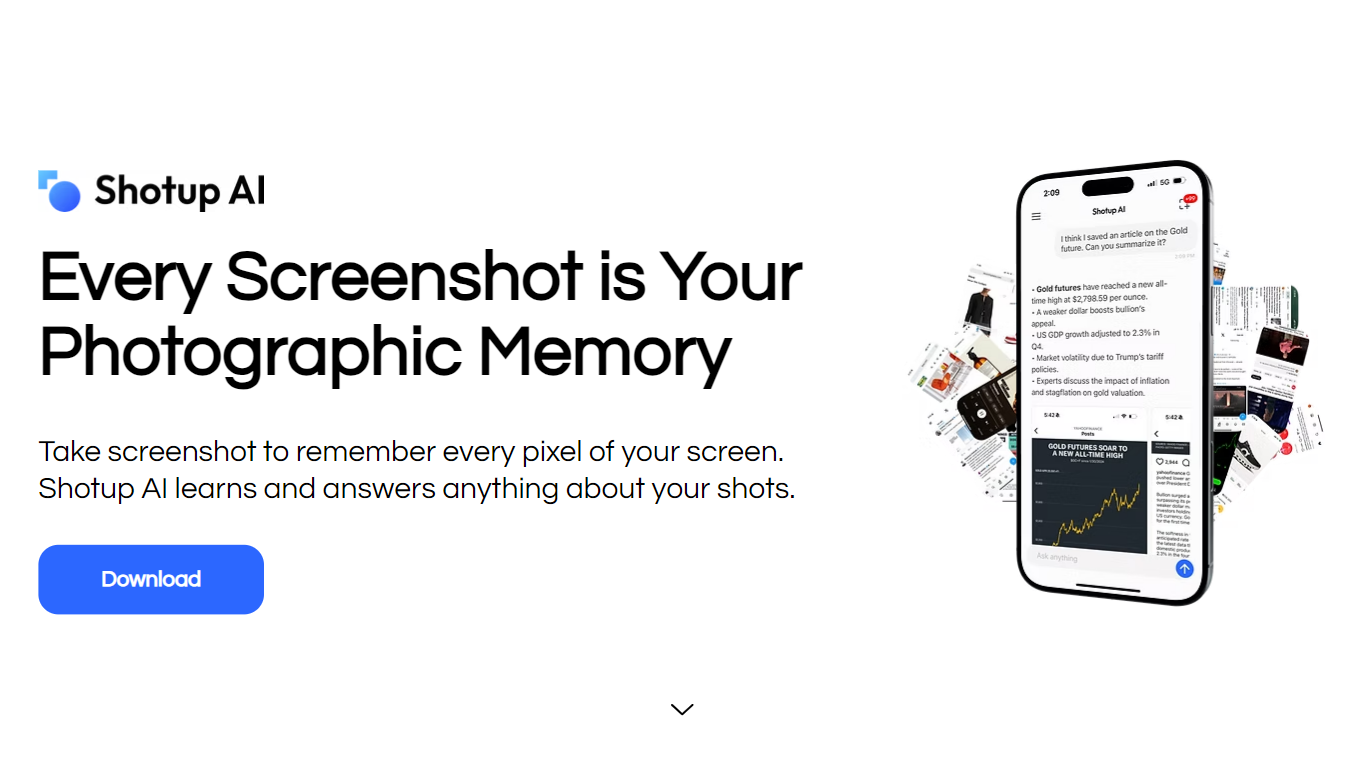

What is Shotup AI?
Shotup AI is an innovative tool designed to learn and remember your screenshots, transforming the way you manage visual information. Its core functionality revolves around taking screenshots and allowing users to ask questions about them, effectively turning every screenshot into a piece of photographic memory. This tool is particularly beneficial for individuals who frequently capture important information on their screens but struggle to keep track of it. By leveraging AI technology, Shotup AI ensures that users can easily retrieve and interact with their saved visuals, enhancing their productivity and organization.
The target audience for Shotup AI includes students, professionals, and anyone who relies on screenshots for information retention. Whether it's for studying, work projects, or personal use, this tool caters to a wide range of users who need a reliable way to remember and access their visual data. The unique value proposition of Shotup AI lies in its ability to not only store screenshots but also to provide contextual understanding and relevant follow-up questions, making it more than just a simple photo management app.
Key differentiators of Shotup AI include its advanced learning capabilities, which allow it to understand the context and visuals of the screenshots rather than just relying on text extraction. This feature sets it apart from traditional photo apps that primarily focus on keyword searches. Additionally, Shotup AI offers custom question recommendations, ensuring that users can easily recall important information without sifting through countless images. The tool also emphasizes productivity by providing reminders and follow-ups based on the saved screenshots, making it a comprehensive memory assistant.
In terms of technical implementation, Shotup AI utilizes AI algorithms to analyze and categorize screenshots quickly. Users can select and sync important shots from their local albums, and the tool learns about these images in a matter of minutes. This seamless integration and learning process make it user-friendly and efficient, allowing individuals to focus on their tasks without worrying about losing important visual information. Overall, Shotup AI is a powerful tool that enhances memory retention and productivity through its innovative approach to managing screenshots.
BrainSoup
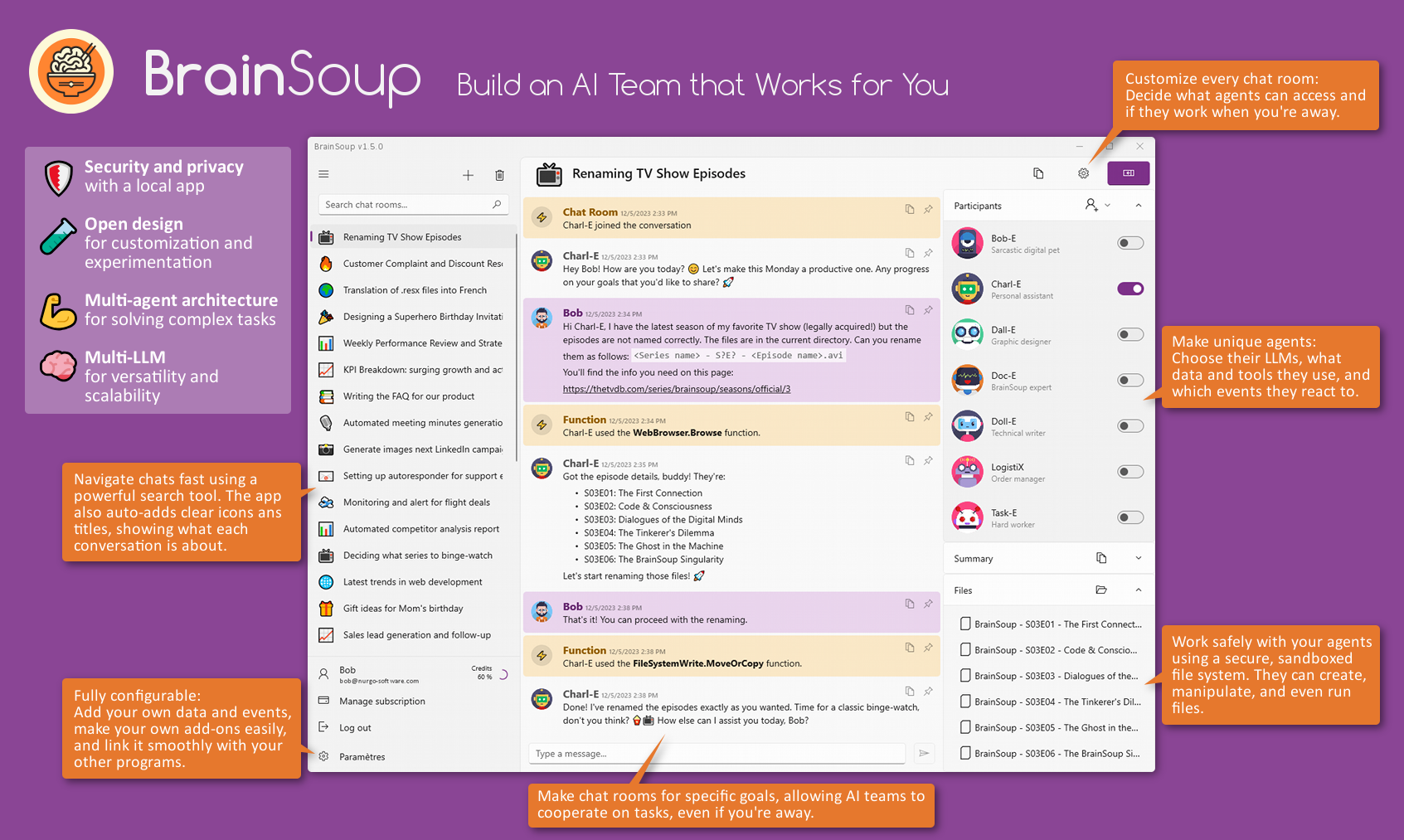
What is BrainSoup?
BrainSoup is a personal AI platform that lets you build custom AI agents tailored to your specific tasks. These agents can automate simple routines or collaborate on complex projects through multi-agent workflows, all controlled via natural language commands. It supports advanced Large Language Models like ChatGPT, Mistral AI, and local LLMs, enhanced by Semantic Kernel technology that gives agents a sense of time and memory, enabling them to remember past interactions for a more personalized experience.
Users can feed BrainSoup with their own documents to expand the AI's knowledge base, making it highly adaptable to unique business needs. The platform prioritizes privacy by storing data locally and anonymizing any requests to third-party AI services, ensuring your information stays secure and is not used for model training. BrainSoup also supports low-code integration, allowing agents to interact with real-time data, user-defined events, and external tools through simple scripts without complex APIs.
Beyond text, BrainSoup agents have multimodal capabilities, processing images and audio to enrich interactions. They come equipped with built-in tools for calculations, web browsing, email sending, API calls, media generation, and script execution, with options to add custom tools and ChatGPT plugins for extended functionality. The user interface is designed like a messaging app, making it intuitive and accessible for both beginners and experts.
A built-in expert agent named Doc-E assists users with setup and advanced configurations, serving as both a helper and an example of what can be created. BrainSoup is currently available as a native Windows application with plans to expand to other platforms and add features like command-line interface, more LLM options, event sources, and optional cloud sync with client-side encryption. It is offered as a subscription starting at $5 per month, providing a low-commitment way to harness AI for personal productivity, creative work, customer service automation, and custom AI development.
Shotup AI Upvotes
BrainSoup Upvotes
Shotup AI Top Features
AI Custom Question Recommendations: This feature helps users by suggesting relevant questions about their screenshots, making it easier to recall important information without searching through all saved images.
Learning Context and Visuals: Shotup AI understands the context and visuals of screenshots, allowing users to find the right images based on what they remember, rather than just keywords.
Quick and Easy Sync: Users can quickly select and sync important screenshots from their local albums, enabling Shotup AI to learn and organize these images efficiently.
Follow-ups and Reminders: The tool enhances productivity by providing reminders and follow-ups based on saved screenshots, ensuring users stay on top of important information.
Organized by Category: Shotup AI categorizes screenshots automatically, making it simple for users to find and access their saved visuals when needed.
BrainSoup Top Features
🧠 Custom AI Agents: Build AI helpers tailored to your unique tasks for personalized automation.
🤖 Multi-Agent Collaboration: Coordinate specialized AI agents to handle complex projects efficiently.
🔒 Local Data Storage: Keep your data private with secure, on-device storage and anonymized cloud requests.
🛠️ Built-in Tools & Plugins: Use agents to perform calculations, browse the web, send emails, and more.
🎨 Multimodal Interaction: Engage with AI agents using text, images, and audio for richer communication.
Shotup AI Category
- Agents
BrainSoup Category
- Agents
Shotup AI Pricing Type
- Freemium
BrainSoup Pricing Type
- Paid