ThumbnailCreator vs Waifu2x
In the clash of ThumbnailCreator vs Waifu2x, which AI Image Generation tool emerges victorious? We assess reviews, pricing, alternatives, features, upvotes, and more.
When we put ThumbnailCreator and Waifu2x head to head, which one emerges as the victor?
Let's take a closer look at ThumbnailCreator and Waifu2x, both of which are AI-driven image generation tools, and see what sets them apart. ThumbnailCreator stands out as the clear frontrunner in terms of upvotes. ThumbnailCreator has been upvoted 100 times by aitools.fyi users, and Waifu2x has been upvoted 15 times.
Want to flip the script? Upvote your favorite tool and change the game!
ThumbnailCreator


What is ThumbnailCreator?
ThumbnailCreator turns a YouTube video link or text prompt into click-ready thumbnail images in about 30 seconds. Paste a URL and the tool reads the transcript, scans key frames, and returns multiple layout concepts tuned to your video topic. YouTube creators use it when they need fresh cover art without opening Photoshop or hiring a designer for every upload.
Unlike template editors like Canva, ThumbnailCreator starts from your actual video content rather than blank canvases. It also bundles face swap, expression morphing, and an AI Viral Clips workflow that cuts long uploads into Shorts and Reels hooks, features most general design tools do not ship in one subscription.
Solo creators posting one or two videos a week can stay on the Starter plan at $17 per month, while agencies managing multiple channels move to Teams for batch variations and API access. The site lists 15,000+ active creators and a 7-day trial with 10 free credits, no credit card required on signup.
Waifu2x
What is Waifu2x?
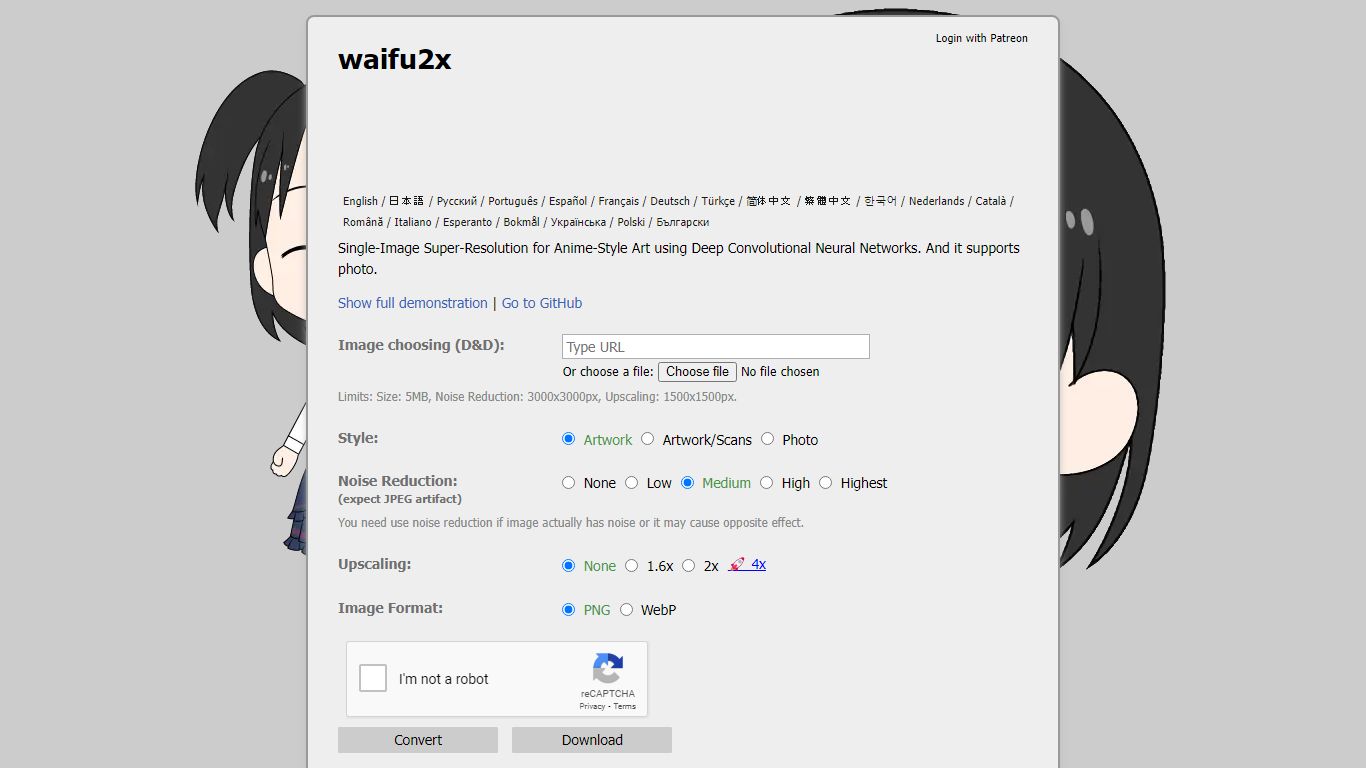
Waifu2x upscales a single anime-style illustration or photo in your browser using deep convolutional neural networks trained for super-resolution. Upload a file or drag one in, pick artwork or photo mode, set noise reduction, and export at up to 2x scale on the free tier.
Generic photo enlargers smooth details into mush on line art, while heavy denoisers blur clean scans that never needed cleanup. Waifu2x separates artwork, scan, and photo styles, warns you to skip noise reduction on clean images, and caps dimensions so the public server stays responsive for everyone.
Anime artists, manga scan editors, and photographers use Waifu2x when they need a quick upscale without installing local CUDA builds. The hosted tool limits files to 5MB with 3000 by 3000 pixel noise reduction and 1500 by 1500 upscaling caps, and Patreon supporters unlock higher limits like 4x scaling.
ThumbnailCreator Upvotes
Waifu2x Upvotes
ThumbnailCreator Top Features
Paste a YouTube URL and get multiple thumbnail concepts in about 30 seconds
1 credit equals 1 AI thumbnail; Lite plan starts at $8 per month after a 7-day trial
Creator plan at $33 per month includes Advanced Face Training and person swap
Auto-Optimize and variation generator on Starter ($17/mo) and higher tiers
Export at YouTube-optimized resolution or upload directly to your channel
AI Viral Clips finds hook moments in long videos for Shorts, TikTok, and Reels
Waifu2x Top Features
Processes single images up to 5MB with separate artwork, scan, and photo style modes
Noise reduction supports up to 3000 by 3000 pixels with five intensity levels
Free upscaling caps at 1500 by 1500 pixels with 1.6x and 2x scale options
Exports PNG or WebP after processing in the browser interface
Open source waifu2x models live in the nagadomi/nunif GitHub repository
Patreon or Fantia.jp support unlocks higher limits including 4x upscaling
Site available in more than 15 languages from the homepage language switcher
ThumbnailCreator Category
- Image Generation
Waifu2x Category
- Image Generation
ThumbnailCreator Pricing Type
- Freemium
Waifu2x Pricing Type
- Free