AI Image Upscaler on AI Image Enlarger vs InstructPix2Pix
When comparing AI Image Upscaler on AI Image Enlarger vs InstructPix2Pix, which AI Photo Editing tool shines brighter? We look at pricing, alternatives, upvotes, features, reviews, and more.
In a comparison between AI Image Upscaler on AI Image Enlarger and InstructPix2Pix, which one comes out on top?
When we put AI Image Upscaler on AI Image Enlarger and InstructPix2Pix side by side, both being AI-powered photo editing tools, With more upvotes, InstructPix2Pix is the preferred choice. InstructPix2Pix has 98 upvotes, and AI Image Upscaler on AI Image Enlarger has 6 upvotes.
Feeling rebellious? Cast your vote and shake things up!
AI Image Upscaler on AI Image Enlarger


What is AI Image Upscaler on AI Image Enlarger?
This Imglarger photo editing tool enlarges JPG, PNG, or WebP images to 2x or 4x resolution in your browser. You upload a file up to 10 MB and 1024 px wide, pick a scale factor, and the model sharpens edges and textures for 4K screens, product catalogs, or social posts. It handles portraits, AI art, anime frames, and product shots without installing desktop software.
Standard resize tools stretch pixels and leave blurry blocks. Imglarger's upscaler rebuilds detail with a focused workflow: upload, choose 200% or 400%, preview side by side, then download. You give up local batch power on the free tier and must trust cloud processing, though files auto-delete within six hours.
E-commerce teams batch-prepare catalog assets on paid plans. Digital artists upscale Midjourney or Stable Diffusion outputs, and photographers rescue compressed client files before print runs.
InstructPix2Pix
What is InstructPix2Pix?
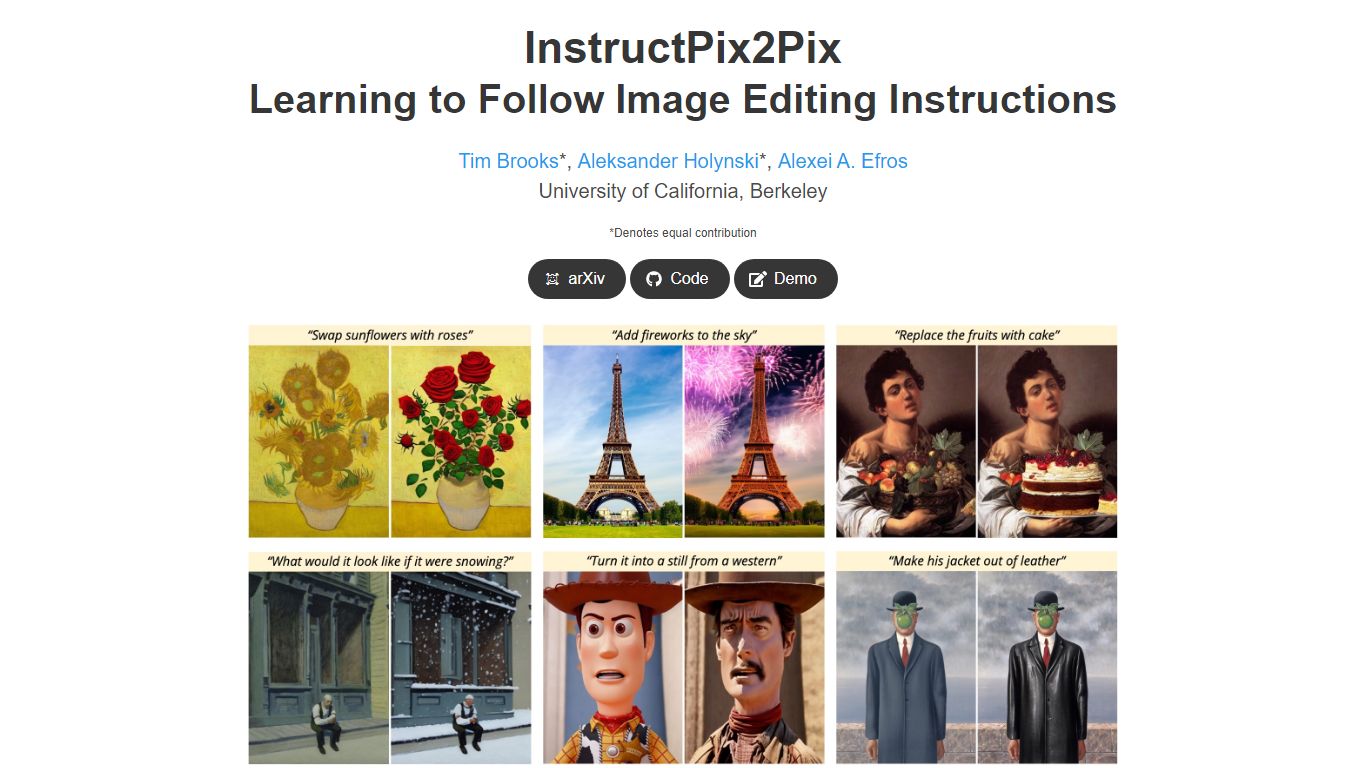
InstructPix2Pix edits a photo from a plain-language instruction such as "make the sky sunset orange" or "turn this into a watercolor." You provide an input image and a short text command, and the model returns an edited version in seconds without training on that specific photo first. It was published as a CVPR 2023 Highlight by researchers at UC Berkeley.
Mask-based editors make you paint regions before changing anything. InstructPix2Pix runs a single forward pass from text alone, skipping per-image fine-tuning or inversion steps that slow other diffusion edit workflows. The trade-off shows up in the paper's failure cases: viewpoint changes, object swaps, and tight local edits remain weak spots.
The project ships open source code on GitHub and a Hugging Face demo space for trying edits in a browser. Training combined GPT-3 and Stable Diffusion to synthesize instruction pairs, and the released model generalizes to real photos up to about 768 pixels wide despite 256x256 training resolution.
AI Image Upscaler on AI Image Enlarger Upvotes
InstructPix2Pix Upvotes
AI Image Upscaler on AI Image Enlarger Top Features
Upscale images to 200% or 400% with a single upload step
Accepts JPG, PNG, and WebP files up to 10 MB and 1024 px input width
Preview upscaled output beside the original before downloading
Batch upscale multiple images on paid plans starting at $4.99 per month
Processed files are automatically deleted within six hours
Dedicated anime upscaler and enlarger tools live on the same Imglarger site
InstructPix2Pix Top Features
Edit an uploaded image from a written instruction without manual masking or per-image fine-tuning
Runs edits in a forward pass and returns results in seconds rather than minutes-long inversion workflows
Generalizes to real photos up to about 768 pixels wide despite 256x256 training resolution
Open source code on github.com/timothybrooks/instruct-pix2pix with a Hugging Face demo space
Allows chained instructions where multiple sequential edits compound on the same photo
AI Image Upscaler on AI Image Enlarger Category
- Photo Editing
InstructPix2Pix Category
- Photo Editing
AI Image Upscaler on AI Image Enlarger Pricing Type
- Freemium
InstructPix2Pix Pricing Type
- Free