AirCaption vs Video Editor By VIDIO
In the contest of AirCaption vs Video Editor By VIDIO, which AI Video Editing tool is the champion? We evaluate pricing, alternatives, upvotes, features, reviews, and more.
If you had to choose between AirCaption and Video Editor By VIDIO, which one would you go for?
When we examine AirCaption and Video Editor By VIDIO, both of which are AI-enabled video editing tools, what unique characteristics do we discover? There's no clear winner in terms of upvotes, as both tools have received the same number. Join the aitools.fyi users in deciding the winner by casting your vote.
Feeling rebellious? Cast your vote and shake things up!
AirCaption
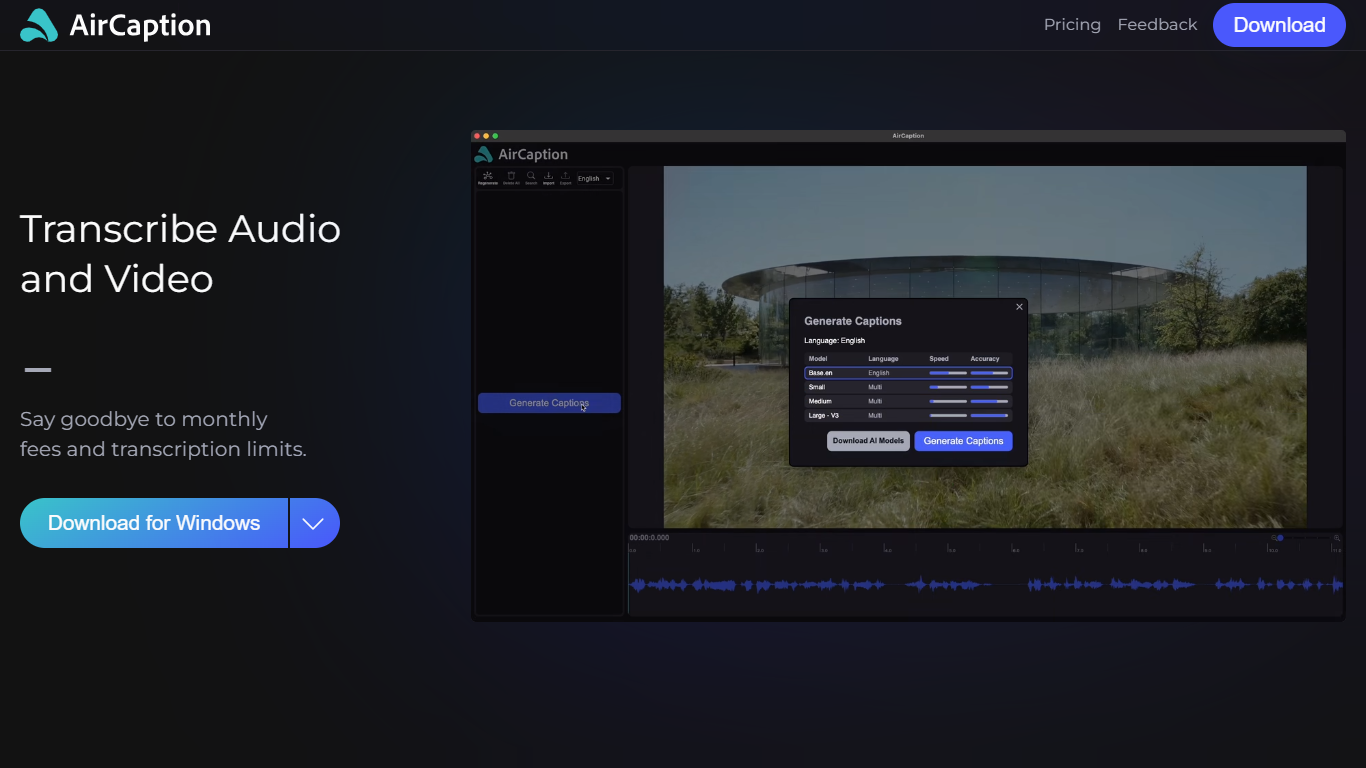

What is AirCaption ?
AirCaption is desktop transcription software for Mac and Windows that turns audio and video into captions, transcripts, and subtitles on your machine. It targets video editors, podcasters, marketers, and anyone who needs fast speech-to-text without uploading media to the cloud.
The app runs locally using NVIDIA Parakeet and OpenAI Whisper models, so files stay on your computer. You generate captions, review timing and text in a built-in editor, then export to SRT, VTT, plain text, or captioned video. It supports batch queueing for folder drops and works offline after setup.
AirCaption subtitles content in up to 67 languages (beta) and ships separate builds for Mac Apple Silicon, Mac Intel, and Windows with NVIDIA GPU or CPU-only options.
Video Editor By VIDIO

What is Video Editor By VIDIO?
Video Editor By VIDIO lets you edit videos in the browser by describing changes in plain language instead of clicking through timeline menus. Upload a clip, tell the assistant what you want changed, and export the result without installing desktop software. It supports GIF, MP4, MOV, WEBM, and other common formats with a 3GB upload cap.
Traditional editors pack dozens of panels most casual creators never open. Video Editor By VIDIO deliberately keeps the workflow to three steps: upload, chat your request, download. That narrow focus fits social clips, quick captioning, and cleanup jobs where opening Premiere would be overkill.
The tool handles short-form cuts, auto captions, color filters, audio extraction, silence detection, and background noise removal through the same chat interface. VIDIO reports more than 500,000 users, with ratings of 4.8 on G2 and 4.7 on Trustpilot. Content creators, social media managers, and small teams use it when they need fast edits from any device.
AirCaption Upvotes
Video Editor By VIDIO Upvotes
AirCaption Top Features
Transcribes audio and video locally with NVIDIA Parakeet and OpenAI Whisper models
Works fully offline so media and captions never leave your computer
Built-in editor to adjust caption text and timing before export
Exports SRT, VTT, TXT, or captioned video files
Batch queue lets you drag entire folders in for automatic transcription
Supports subtitle generation in up to 67 languages (beta)
Keyboard hotkeys speed up caption editing workflows
Imports existing SRT and VTT files for re-editing
Video Editor By VIDIO Top Features
Natural-language editing accepts plain-text requests instead of manual timeline work
Supports GIF, MP4, MOV, MPG, WEBM, and MPEG uploads up to 3GB per file
Stitches up to 5 video clips together in a single conversational edit project
Handles captions, color filters, audio extraction, silence detection, and noise removal
Runs entirely in the browser with no local installation required
Free Basic plan available; Pro 20 starts at $8 per month with 20 credits
Rated 4.8 on G2 and 4.7 on Trustpilot across VIDIO's user base
AirCaption Category
- Video Editing
Video Editor By VIDIO Category
- Video Editing
AirCaption Pricing Type
- Freemium
Video Editor By VIDIO Pricing Type
- Freemium