Figflow vs Neverscene
Compare Figflow vs Neverscene and see which AI Design tool is better when we compare features, reviews, pricing, alternatives, upvotes, etc.
Which one is better? Figflow or Neverscene?
When we compare Figflow with Neverscene, which are both AI-powered design tools, Interestingly, both tools have managed to secure the same number of upvotes. You can help us determine the winner by casting your vote and tipping the scales in favor of one of the tools.
Not your cup of tea? Upvote your preferred tool and stir things up!
Figflow
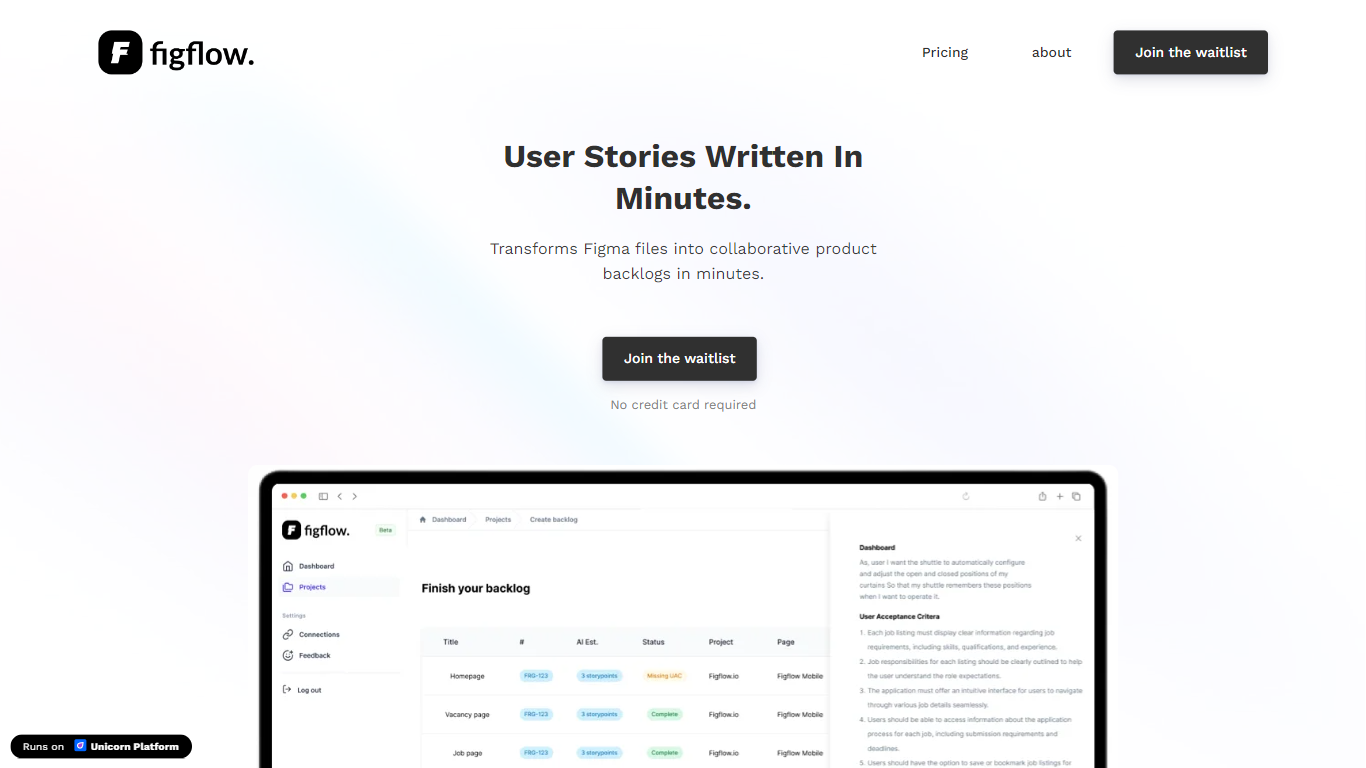

What is Figflow ?
Figflow turns Figma files into structured product backlogs with user stories, acceptance criteria, and story point estimates. You connect Figma through OAuth, upload frames, and Figflow drafts tickets from what is already on the canvas. It targets the handoff gap between design files and sprint-ready work.
Most backlog tools expect you to write stories from scratch. Figflow starts from your Figma screens, embeds design screenshots inside each story, and uses its AI assistant to shape voice and tone. The Professional plan at $9 per month removes the 250-interaction cap on the free Personal tier, which is the main reason teams outgrow the starter plan.
Product owners, product managers, and product designers use Figflow to cut manual story writing before refinement sessions. It fits teams that live in Figma and want a single workspace for multiple projects without exporting screens into a separate doc for every ticket.
Neverscene
What is Neverscene?
Neverscene helps interior designers and design studios generate fresh room visuals without starting from a blank canvas each time. Upload reference images or connect a Pinterest account, and the platform learns your signature style so new living rooms, bedrooms, kitchens, and home offices stay consistent with the look you are known for.
The product is built around repeatable content creation for social channels. You can spin up unlimited interior concepts, design custom furniture pieces, and export finished images at up to 4K resolution on paid plans. A public Discover gallery showcases community work, while Private Mode on higher tiers keeps selected projects off shared feeds.
Neverscene targets interior designers, architects, creative directors, and design studios who need a steady stream of portfolio-ready visuals for pitches, client outreach, and social posts. Starter plans cover personal experimentation, while Pro and Enterprise tiers raise render limits, unlock full image ownership, and add privacy controls for client-facing work.
Figflow Upvotes
Neverscene Upvotes
Figflow Top Features
OAuth Figma integration pulls projects without manual file exports
Personal plan includes 250 free AI interactions before paid upgrade
Professional plan at $9 per month unlocks unlimited AI interactions and projects
AI assistant drafts acceptance criteria from design frames and user stories
Design screenshots attach directly to user stories instead of separate exports
Supports 10 languages including English, Dutch, French, German, Spanish, and Japanese
Neverscene Top Features
Train a signature style by uploading moodboards or linking Pinterest
Generate interiors for living rooms, bedrooms, kitchens, and home offices
Design custom furniture pieces that match your trained aesthetic
Export finished images at up to 4K resolution on paid plans
Switch on Private Mode to keep selected designs off the public gallery
Figflow Category
- Design
Neverscene Category
- Design
Figflow Pricing Type
- Freemium
Neverscene Pricing Type
- Freemium