ThumbnailCreator vs Avachara
Explore the showdown between ThumbnailCreator vs Avachara and find out which AI Image Generation tool wins. We analyze upvotes, features, reviews, pricing, alternatives, and more.
When comparing ThumbnailCreator and Avachara, which one rises above the other?
When we contrast ThumbnailCreator with Avachara, both of which are exceptional AI-operated image generation tools, and place them side by side, we can spot several crucial similarities and divergences. In the race for upvotes, ThumbnailCreator takes the trophy. ThumbnailCreator has been upvoted 100 times by aitools.fyi users, and Avachara has been upvoted 6 times.
You don't agree with the result? Cast your vote to help us decide!
ThumbnailCreator


What is ThumbnailCreator?
ThumbnailCreator turns a YouTube video link or text prompt into click-ready thumbnail images in about 30 seconds. Paste a URL and the tool reads the transcript, scans key frames, and returns multiple layout concepts tuned to your video topic. YouTube creators use it when they need fresh cover art without opening Photoshop or hiring a designer for every upload.
Unlike template editors like Canva, ThumbnailCreator starts from your actual video content rather than blank canvases. It also bundles face swap, expression morphing, and an AI Viral Clips workflow that cuts long uploads into Shorts and Reels hooks, features most general design tools do not ship in one subscription.
Solo creators posting one or two videos a week can stay on the Starter plan at $17 per month, while agencies managing multiple channels move to Teams for batch variations and API access. The site lists 15,000+ active creators and a 7-day trial with 10 free credits, no credit card required on signup.
Avachara
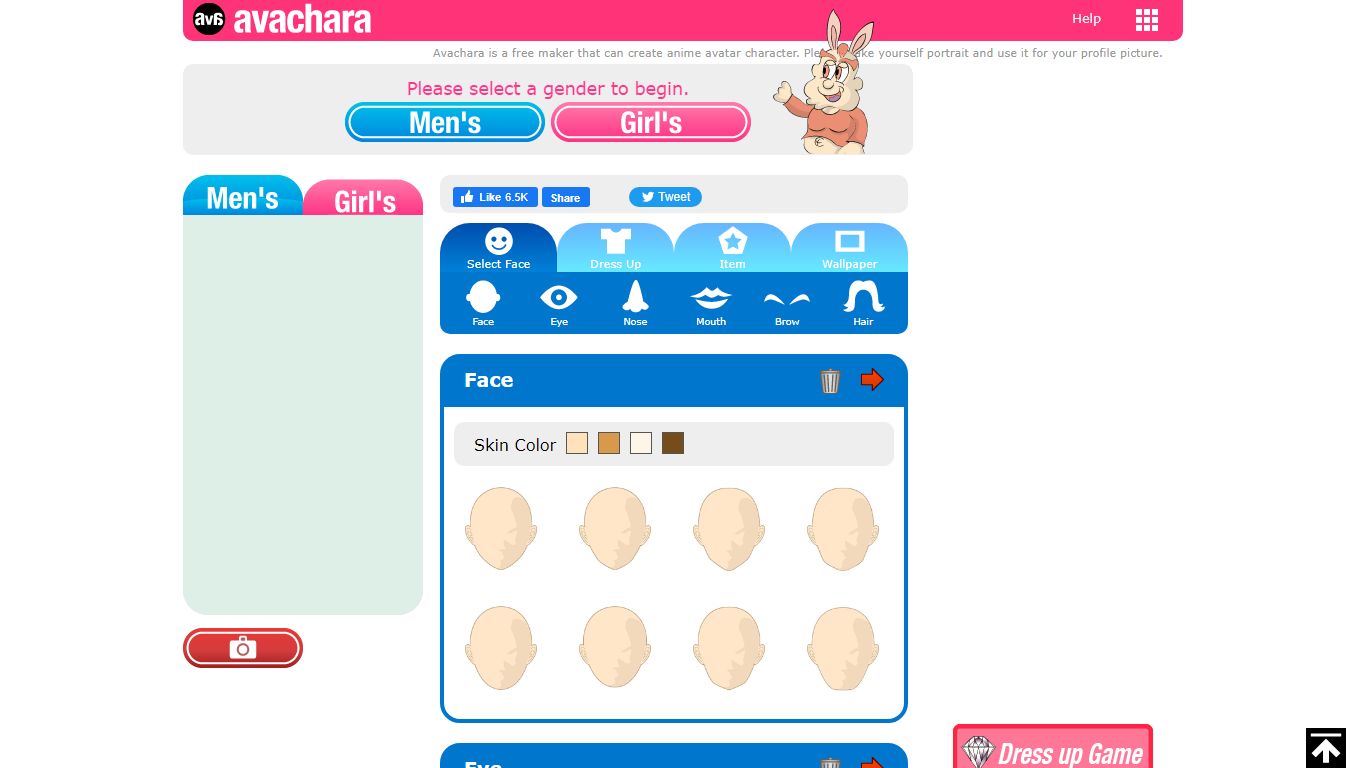
What is Avachara?
Avachara is a browser-based anime avatar maker that lets you build portrait characters for profile pictures without installing software. You pick a gender, then customize skin, eyes, hair, brows, nose, mouth, outfits, items, and wallpapers through a simple dress-up interface.
Compared with AI image generators that produce unpredictable faces from text prompts, Avachara uses fixed illustration parts you combine manually, which gives predictable cute anime results for social avatars. The trade-off is less photorealism and no prompt-based novelty, but also no model credits or signup wall for casual personal use.
Streamers, forum users, and students who want a quick anime profile picture are the obvious audience. Personal avatars are free to create and save via the on-page camera button, while commercial or advertising use requires contacting DESIGNALIKIE for a paid license.
ThumbnailCreator Upvotes
Avachara Upvotes
ThumbnailCreator Top Features
Paste a YouTube URL and get multiple thumbnail concepts in about 30 seconds
1 credit equals 1 AI thumbnail; Lite plan starts at $8 per month after a 7-day trial
Creator plan at $33 per month includes Advanced Face Training and person swap
Auto-Optimize and variation generator on Starter ($17/mo) and higher tiers
Export at YouTube-optimized resolution or upload directly to your channel
AI Viral Clips finds hook moments in long videos for Shorts, TikTok, and Reels
Avachara Top Features
Builds anime portrait avatars in the browser with no download required
Customize face, eyes, hair, brows, nose, mouth, outfits, items, and wallpapers
Saves avatar images through the on-page camera button for right-click download
Supports chat and bulletin board play between created avatar characters on Avachara
Offers separate sister makers such as Anichara animated avatars and Charatore self-portraits
Personal use is free while commercial or advertising use requires a paid license from the publisher
ThumbnailCreator Category
- Image Generation
Avachara Category
- Image Generation
ThumbnailCreator Pricing Type
- Freemium
Avachara Pricing Type
- Free