BgSub vs InstructPix2Pix
Dive into the comparison of BgSub vs InstructPix2Pix and discover which AI Photo Editing tool stands out. We examine alternatives, upvotes, features, reviews, pricing, and beyond.
When comparing BgSub and InstructPix2Pix, which one rises above the other?
When we compare BgSub and InstructPix2Pix, two exceptional photo editing tools powered by artificial intelligence, and place them side by side, several key similarities and differences come to light. In the race for upvotes, InstructPix2Pix takes the trophy. InstructPix2Pix has 98 upvotes, and BgSub has 7 upvotes.
Disagree with the result? Upvote your favorite tool and help it win!
BgSub


What is BgSub?
BgSub removes or replaces photo backgrounds inside your browser without uploading files to a server. The marketing site promises results in about 5 seconds, with one-click cutouts, replacement fills using color, gradients, or images, and an AI coloring pass for quick color tweaks. Processing stays local enough that BgSub highlights a no-upload privacy story on the homepage.
Most background removers send every image to the cloud by default. BgSub leans on in-browser processing and calls out that images are not uploaded during editing, which matters when you are working with client product shots or personal portraits. It also bundles artistic effects plus free adjustment controls for size, position, and mirroring instead of stopping at a plain transparent PNG.
The tool targets individuals polishing social photos, e-commerce sellers refreshing product shots, photographers swapping backgrounds without a green screen, and marketers testing ad creatives. Sample galleries on bgsub.com show people, products, animals, clothes, and plants, and the FAQ notes commercial use is allowed on processed images.
InstructPix2Pix
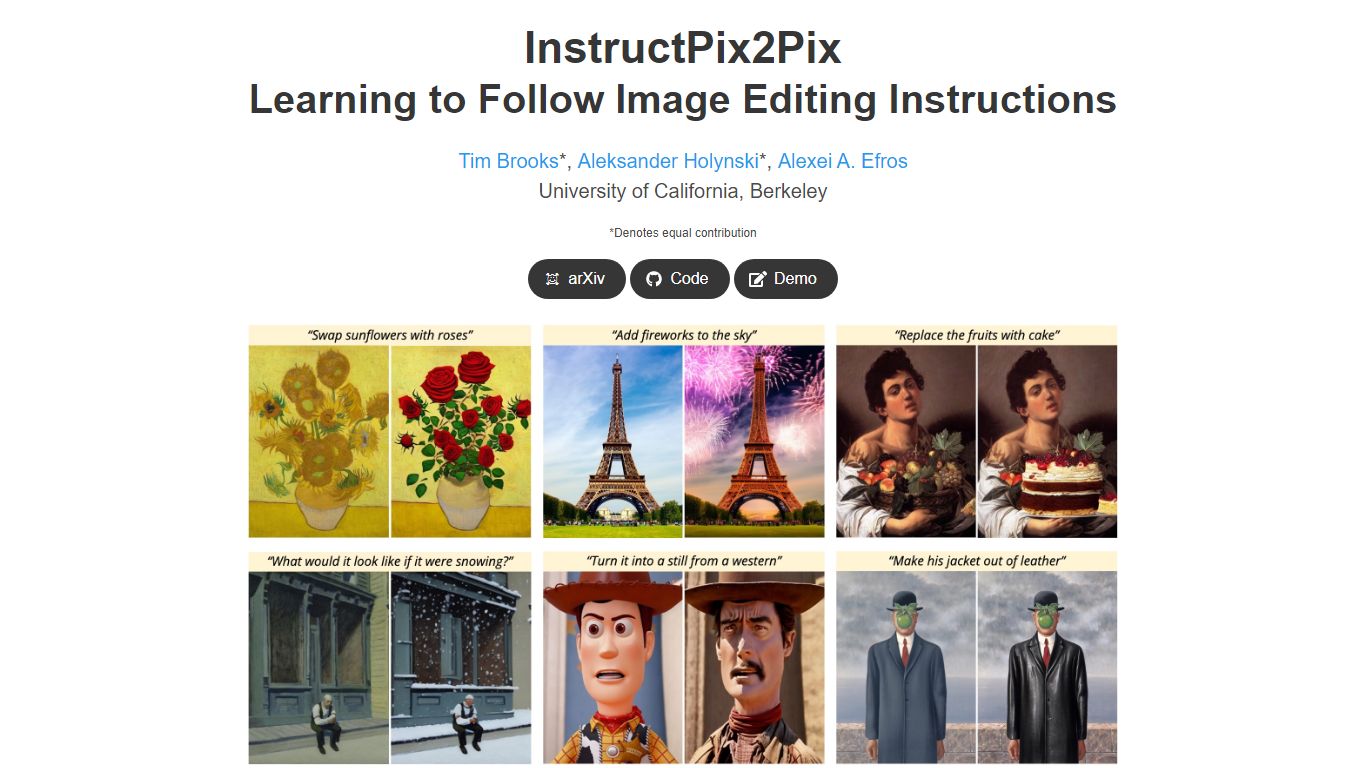
What is InstructPix2Pix?
InstructPix2Pix edits a photo from a plain-language instruction such as "make the sky sunset orange" or "turn this into a watercolor." You provide an input image and a short text command, and the model returns an edited version in seconds without training on that specific photo first. It was published as a CVPR 2023 Highlight by researchers at UC Berkeley.
Mask-based editors make you paint regions before changing anything. InstructPix2Pix runs a single forward pass from text alone, skipping per-image fine-tuning or inversion steps that slow other diffusion edit workflows. The trade-off shows up in the paper's failure cases: viewpoint changes, object swaps, and tight local edits remain weak spots.
The project ships open source code on GitHub and a Hugging Face demo space for trying edits in a browser. Training combined GPT-3 and Stable Diffusion to synthesize instruction pairs, and the released model generalizes to real photos up to about 768 pixels wide despite 256x256 training resolution.
BgSub Upvotes
InstructPix2Pix Upvotes
BgSub Top Features
Homepage meta promises background removal or replacement in about 5 seconds in the browser
Processing runs without uploading images, according to the privacy FAQ answer
Replace backgrounds with solid color, gradients, or custom image fills
AI Coloring offers one-click automatic color adjustment on cutout subjects
Free adjustment controls cover size, position, and mirroring after the cutout
Supports images up to 4096 x 4096 resolution per the FAQ
Artistic effects layer on top of the base cutout for quick creative variants
InstructPix2Pix Top Features
Edit an uploaded image from a written instruction without manual masking or per-image fine-tuning
Runs edits in a forward pass and returns results in seconds rather than minutes-long inversion workflows
Generalizes to real photos up to about 768 pixels wide despite 256x256 training resolution
Open source code on github.com/timothybrooks/instruct-pix2pix with a Hugging Face demo space
Allows chained instructions where multiple sequential edits compound on the same photo
BgSub Category
- Photo Editing
InstructPix2Pix Category
- Photo Editing
BgSub Pricing Type
- Free
InstructPix2Pix Pricing Type
- Free