Remove Bg AI vs Befront
When comparing Remove Bg AI vs Befront, which AI Design tool shines brighter? We look at pricing, alternatives, upvotes, features, reviews, and more.
Between Remove Bg AI and Befront, which one is superior?
When we put Remove Bg AI and Befront side by side, both being AI-powered design tools, Both tools have received the same number of upvotes from aitools.fyi users. Every vote counts! Cast yours and contribute to the decision of the winner.
Feeling rebellious? Cast your vote and shake things up!
Remove Bg AI

What is Remove Bg AI?
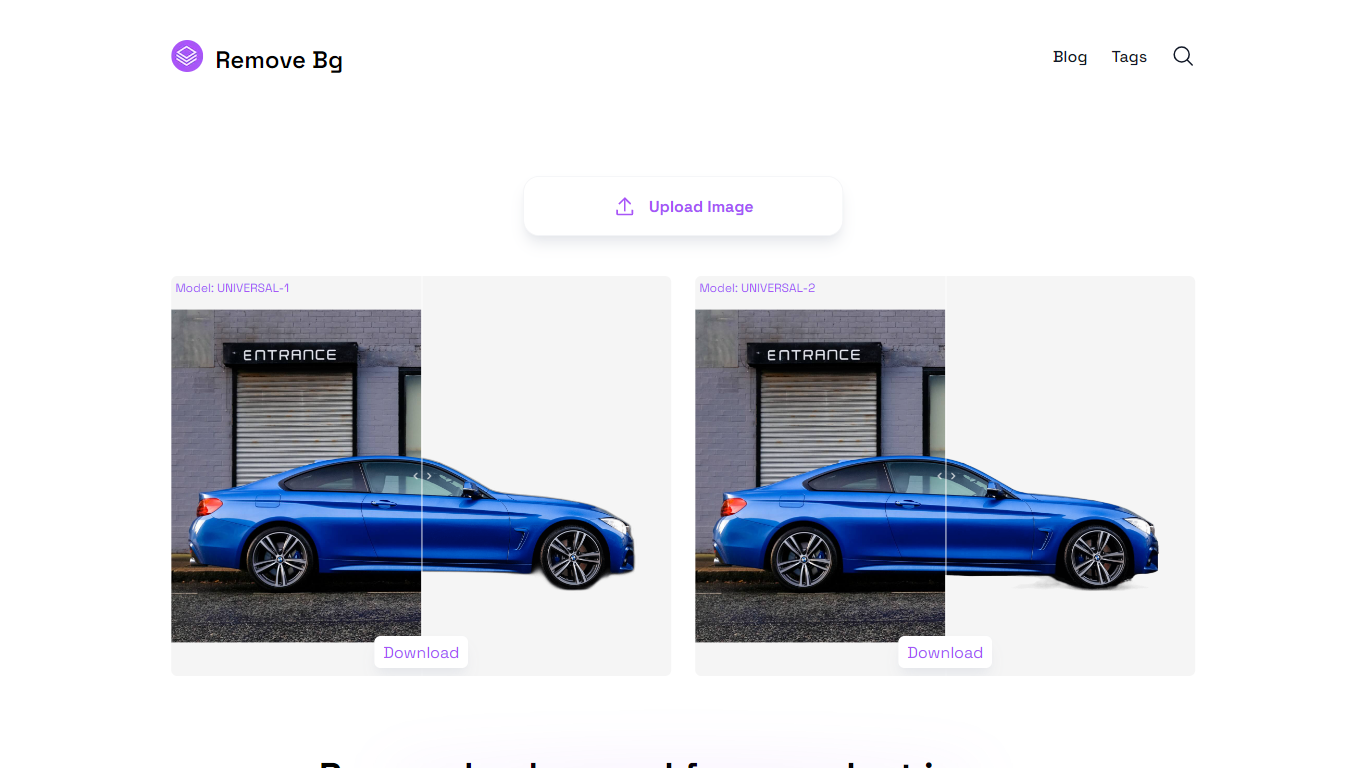
Remove Bg AI removes backgrounds from images directly on your device by processing them locally in your browser. It downloads an AI model to your browser, enabling background removal without uploading images to any server, ensuring privacy and security.
This tool stands out by offering offline processing with multiple AI models tailored for universal images, portraits, or faster results. Users can balance quality and speed depending on their device capabilities, unlike many alternatives that require online uploads.
Remove Bg AI supports common image formats including PNG, JPG, JPEG, and WEBP, with size limits up to 6400 pixels and 10 MB. It also provides mask editing tools to refine cutouts by removing or restoring parts before saving the final transparent image.
Ideal for professionals and hobbyists, Remove Bg AI requires no account or subscription and works on modern browsers across desktop and mobile devices. It processes one image at a time and is currently in maintenance mode, offering free access without new paid plans.
Overall, Remove Bg AI delivers a straightforward, privacy-focused solution for background removal suitable for product photography, graphic design, social media content, marketing materials, and personal projects.
Befront
What is Befront?
Befront is a Figma Community plugin that works as a hands-on design trainer. You install it in Figma, pick a skill to train, and complete short UI tasks on real interfaces with instant feedback as you work. It focuses on practical layout and component work rather than passive theory.
Most design courses lean on video lectures that are easy to watch and hard to retain. Befront runs short drills you can finish in about five minutes, with topic picks like Auto Layout and components instead of a fixed syllabus. That makes it closer to a daily gym routine than a semester-long course.
The homepage positions Befront for designers who feel stuck in Figma, working designers who want more speed, and career switchers learning UX/UI from scratch. Developers, product managers, founders, and marketers who need to work confidently in Figma are also called out in the FAQ.
You track progress over time, compete with other designers, and can try design mini-games for quick interactive practice. A free trial offers access to trial lessons, while paid plans start at $11 per week or $30 per month for full access.
Remove Bg AI Upvotes
Befront Upvotes
Remove Bg AI Top Features
🖥️ Local Processing: All background removal happens in your browser, keeping your photos private on your device.
🎨 Mask Editing: Refine cutouts by removing or restoring parts of the image before saving the final result.
📁 Wide Format Support: Handles PNG, JPG, JPEG, and WEBP images up to 6400 pixels and 10 MB in size.
⚡ Multiple AI Models: Choose from universal, portrait, or fast models to balance quality and speed based on your device.
🚗 Versatile Use Cases: Supports products, portraits, animals, vehicles, logos, and graphics for various projects.
Befront Top Features
Daily drills you can finish in about five minutes with instant feedback inside Figma
Monthly plan at $30 per month or Weekly plan at $11 per week for full access to all content
Topic-specific training for Auto Layout, components, and other job-ready Figma skills
Design mini-games for quick interactive practice on real interfaces
Free Trial at $0 with access to trial lessons inside the Figma plugin
Remove Bg AI Category
- Design
Befront Category
- Design
Remove Bg AI Pricing Type
- Free
Befront Pricing Type
- Freemium