
Last updated 07-27-2026
Category:
Reviews:
Join thousands of AI enthusiasts in the World of AI!
PDF To Brainrot AI
PDF To Brainrot AI converts PDFs and other text documents into short, engaging TikTok-style videos known as 'brainrot' content. These videos transform dense academic or informational material into entertaining clips that help users learn and retain information more effectively.
What distinguishes PDF To Brainrot AI from other tools is its ability to quickly generate dynamic, bite-sized videos with customizable modes such as Brainrot Mode, Quiz Mode, and Raw Mode. This unique approach blends education with entertainment, catering to modern content consumption habits.
The tool supports multiple input formats including PDFs, Word documents, plain text, and Google Docs. Users can personalize videos by selecting from various AI voice options and adding background music or videos. PDF To Brainrot AI offers fast video generation, delivering content in seconds, which is ideal for quick study sessions or content creation.
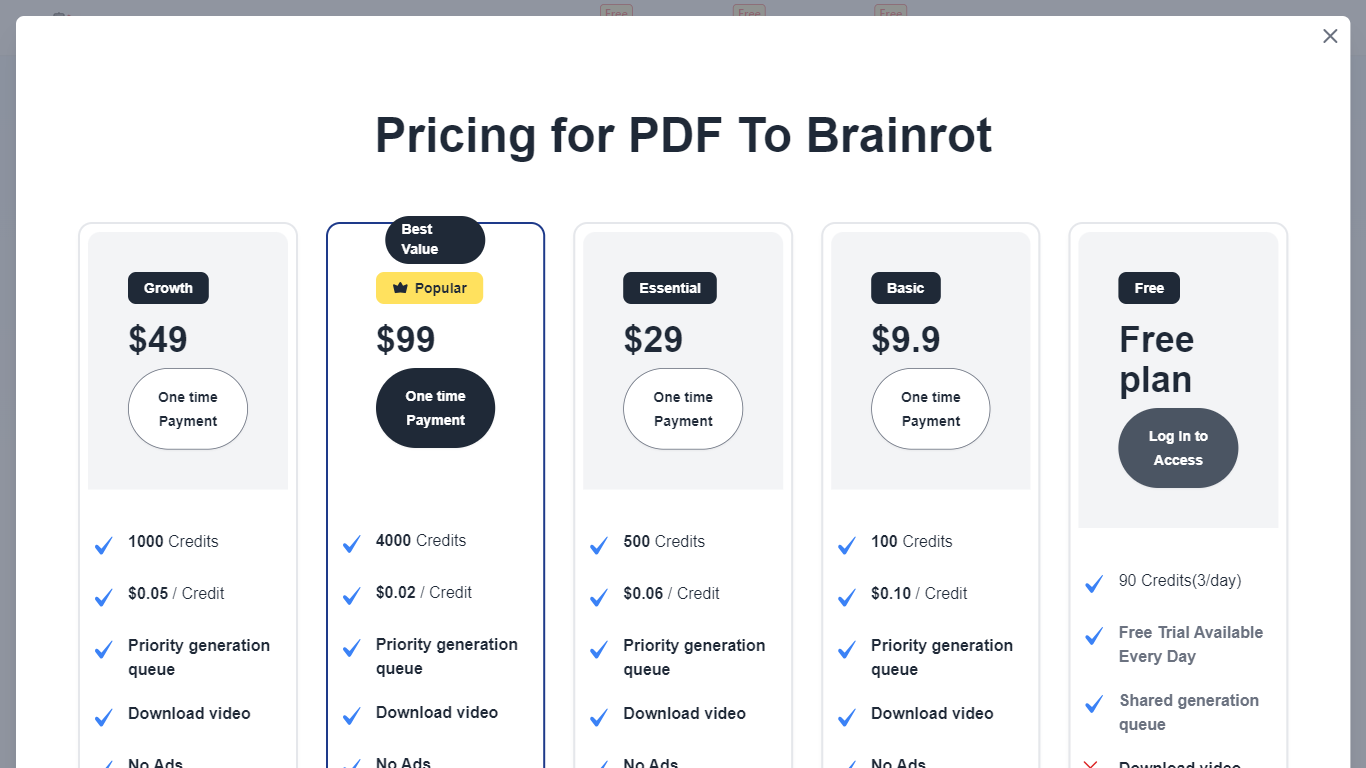
PDF To Brainrot AI uses a credit-based pricing system with free daily credits and paid plans for higher usage, including priority processing and ad-free experiences. It enforces responsible content use by prohibiting illegal or NSFW material and ensures user data privacy.
Overall, PDF To Brainrot AI transforms traditional study materials into memorable, viral-style videos that enhance learning and engagement for students, educators, professionals, and lifelong learners.
📄 Convert PDFs, Word docs, or plain text into engaging brainrot videos
⚡ Generate videos in seconds for quick study or content creation
🎭 Select from Brainrot Mode, Quiz Mode, and Raw Mode video styles
🔊 Customize AI voices and add background music or videos
💳 Credit-based pricing with 30 free daily credits and paid plans starting at $9.9
💻 Access and share videos on any device anytime, anywhere
Transforms complex PDFs and texts into engaging, memorable videos
Supports multiple input types including PDFs, Word documents, and plain text
Offers customizable video modes and AI voice options
Fast processing suitable for last-minute study or content creation
Accessible across devices for flexible learning
Credit-based system may limit free usage
Customization options may require a learning curve for best results
Some advanced features require paid plans
What is 'brainrot' content?
Brainrot content in PDF To Brainrot AI consists of short, engaging, often humorous videos inspired by TikTok trends that make academic material easier to digest and remember.
Can PDF To Brainrot AI handle all subjects?
Yes, PDF To Brainrot AI adapts to any subject, from literature and biology to advanced physics, creating fun and engaging videos for all topics.
How does PDF To Brainrot AI improve learning?
PDF To Brainrot AI improves learning by turning dense academic material into entertaining videos, boosting engagement and retention to make learning more enjoyable and effective.
Is PDF To Brainrot AI suitable for professional training?
Absolutely, PDF To Brainrot AI allows professionals to create engaging training materials, presentations, and team-building content.
What video types can I create with PDF To Brainrot AI?
With PDF To Brainrot AI, you can create Brainrot Mode videos (quirky TikTok style), Quiz Mode (interactive Q&A), and Raw Mode (straightforward presentations).
Can I customize voices and music in PDF To Brainrot AI?
Yes, PDF To Brainrot AI lets you choose from various AI voices and add your own background music or select from royalty-free tracks.
Can I convert plain text besides PDFs with PDF To Brainrot AI?
Yes, PDF To Brainrot AI's Text to Brainrot feature lets you convert any text into engaging brainrot videos quickly and easily.