
Last updated 08-20-2026
Category:
Reviews:
Join thousands of AI enthusiasts in the World of AI!
PromptFolder
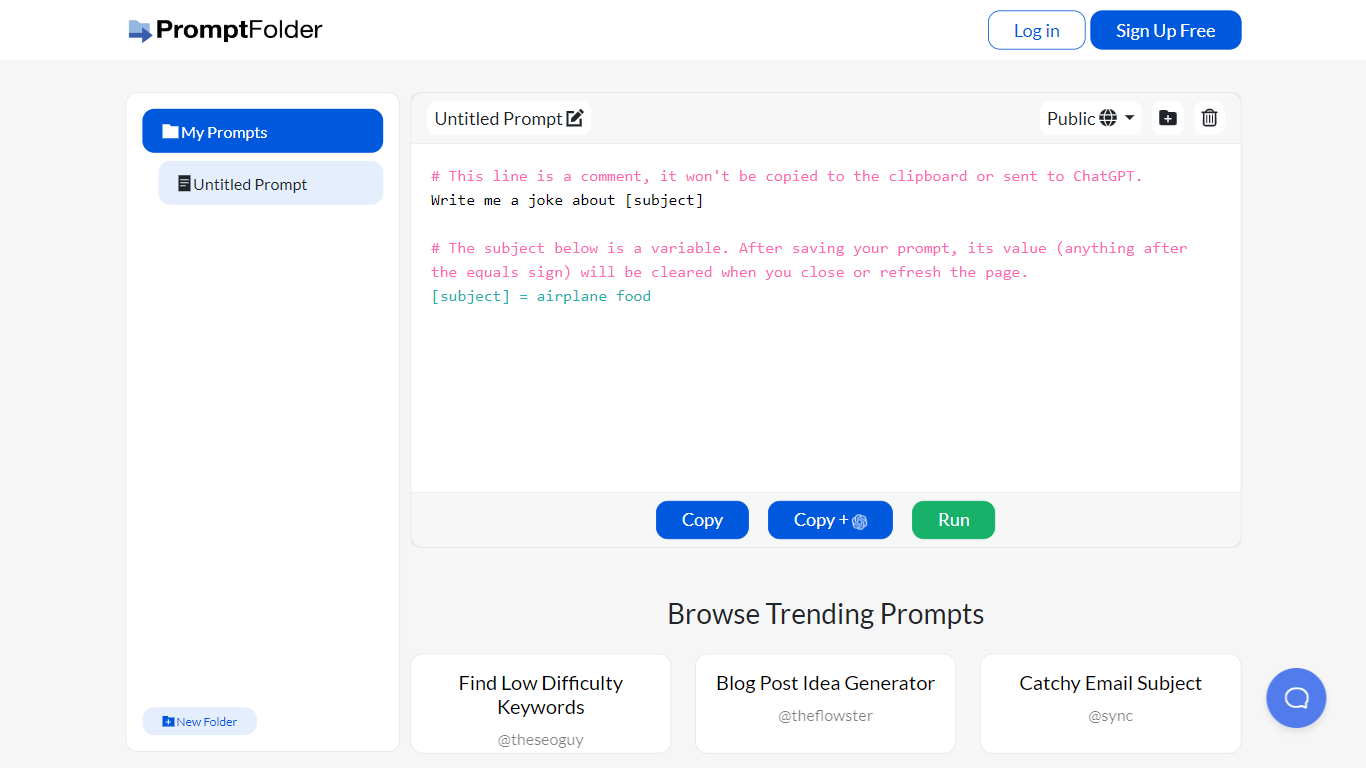
PromptFolder is a web prompt manager for ChatGPT, Midjourney, and other AI tools. You draft prompts with bracket placeholders like [subject], file them in folders, and launch them from the built-in editor. Free signup unlocks your personal library, and the homepage highlights trending prompts other users have shared.
Generic note apps store plain text. PromptFolder treats each entry as a reusable template with editable variables, an Advanced Editor that sets tone (Casual through Humorous) and length in Words or Sentences, and a Run button that sends the draft to ChatGPT. A Chrome extension mirrors the library inside ChatGPT so you stop copying the same blocks by hand.
Repeat ChatGPT workflows benefit most. Founder Cole South built it for his e-commerce store after retyping prompts daily, and the trending feed leans toward SEO titles, blog ideas, and keyword prompts. Midjourney users get a dedicated helper with aspect ratios, version picks up to v6 and niji, plus chaos, stylize, and seed fields laid out as form controls instead of memorized flags.
Bracket variables like [subject] stay editable inside saved prompts so one template covers many topics
Chrome Web Store extension (pcollgbgdjbfmjkgkooifpbakhiaedmn) opens PromptFolder inside ChatGPT
Midjourney Prompt Helper lists aspect ratios from 1:1 through 16:9, versions 1 through 6 plus niji, and sliders for chaos and stylize
Advanced Editor sets tone across Casual, Professional, Serious, and Humorous with length counted in Words or Sentences
Browse Trending Prompts surfaces public saves such as SEO Meta Title Writer and Blog Post Idea Generator
Free on-site tools include a Midjourney Prompt Generator, ChatGPT Detector, and AI YouTube Summarizer
Free signup with no paid tier listed on the site
Variables and folders reduce retyping for repeat ChatGPT workflows
Midjourney helper exposes major bot parameters as form fields
Chrome extension inserts saved prompts inside ChatGPT
Trending public prompts offer ready-made SEO and content templates
Saving prompts and folders requires creating a free account
No dedicated mobile app beyond the browser and Chrome extension
No pricing page, so team or enterprise plans are not documented
Is PromptFolder free to use?
Yes, PromptFolder is free. The homepage offers a Sign Up Free account with no paid plan listed on the site, and core features like saving prompts, folders, and the prompt editor are available after registration at no cost.
Does PromptFolder work with Midjourney?
Yes. PromptFolder includes a Midjourney Prompt Generator that builds /imagine prompts with aspect ratio, version, quality, chaos, stylize, and style preset fields. You copy the finished prompt and run it in Midjourney, then save it back to your PromptFolder account.
What does the PromptFolder Chrome extension do?
The PromptFolder Chrome extension installs from the Chrome Web Store and lets you access your saved prompts directly inside ChatGPT. PromptFolder promotes it on the homepage so you can insert templates without leaving the ChatGPT tab.
How do variables work in PromptFolder prompts?
PromptFolder prompts use bracket placeholders such as [subject] or [topic] that you fill in before running. The editor keeps those slots visible, clears them on refresh when noted, and copies the finished text to ChatGPT with one click.
Can I browse other users' prompts on PromptFolder?
Yes. PromptFolder shows a Browse Trending Prompts section with public saves like SEO Meta Title Writer and Find Low Difficulty Keywords, each linked to the author's profile page where you can copy or save the prompt.
Do I need an account to use PromptFolder?
You can try the editors and copy prompts without signing in, but saving prompts to folders, using My Prompts, and syncing through the Chrome extension require a free PromptFolder account created from the Sign Up Free link.