
Last updated 07-28-2026
Category:
Reviews:
Join thousands of AI enthusiasts in the World of AI!
Formix Assistant
Formix Assistant turns your r??sum??s, product specs, and other reference files into completed web form fields through a Chrome extension. You attach documents and prompts once, then let Formix generate answers for job applications, checkout pages, and classified listings across the sites you visit. A separate Formix PDF beta at formixpdf.formix.ai handles PDF form filling in the browser.
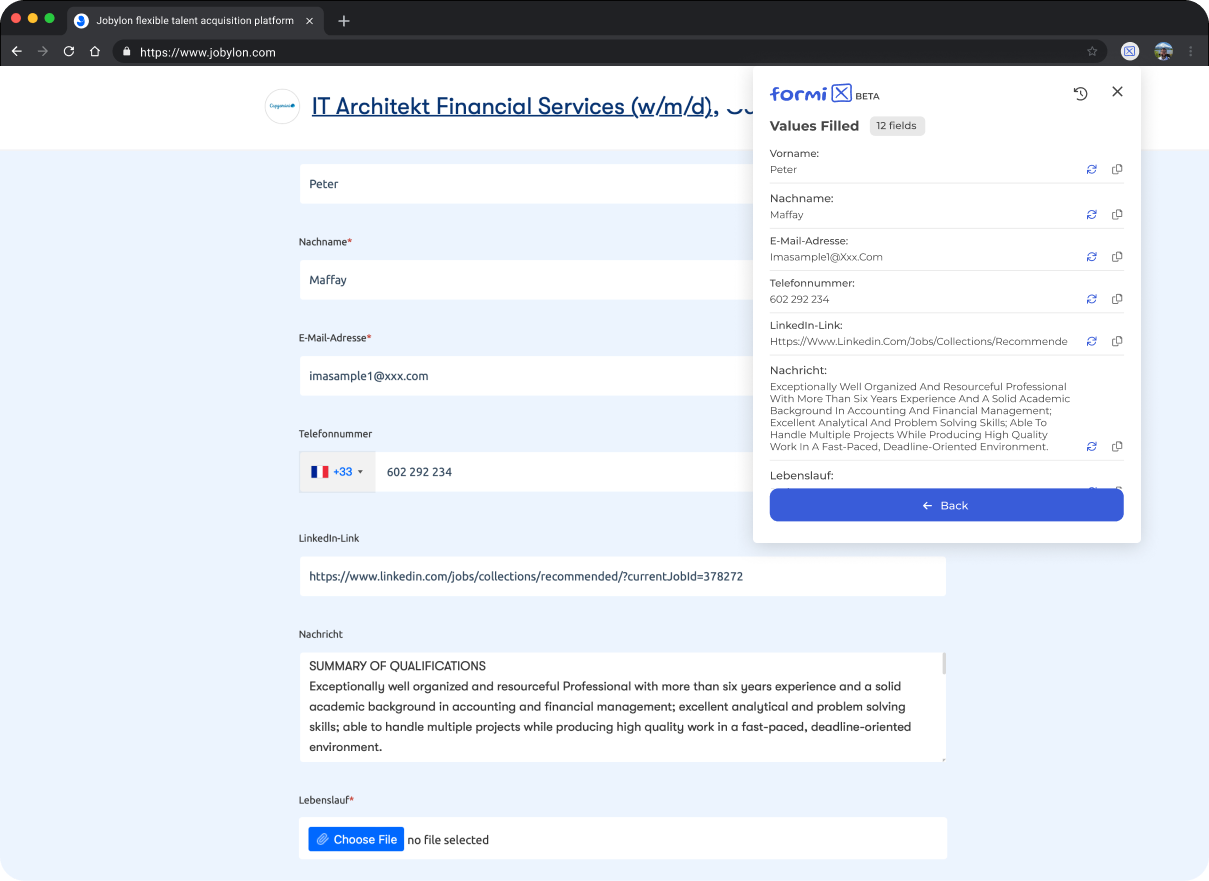
Most autofill tools memorize your name and address once. Formix takes a different path: it reads your uploaded documents and prompts on each run, stores that material locally in Chrome rather than on Formix servers, and fills text fields without clicking submit buttons. You review highlighted suggestions and submit manually, which cuts down on wrong auto-submissions on sites like eBay, Craigslist, Indeed, and Google Forms.
Job seekers filling repetitive application forms, online shoppers speeding through checkout, and anyone posting classified ads benefit most from this form automation workflow. Formix Pro, listed at $5 per month on a waiting list, raises daily limits, document size caps, and prompt history depth beyond the free extension.
Chrome extension fills text fields and dropdowns on eBay, Craigslist, Indeed, and Google Forms
Documents and prompts stay in local Chrome storage, not on Formix servers
Regenerate any single field without redoing the entire form
Formix Pro waiting list opens at $5 per month with higher daily limits and larger document caps
Formix PDF beta at formixpdf.formix.ai fills PDF forms online in the browser
Local-only storage keeps documents and prompts on your device instead of Formix servers.
Never clicks submit buttons, so you control when a form actually goes through.
Per-field regeneration lets you fix one bad answer without redoing the whole form.
Free Chrome extension covers job applications, checkout pages, and classified listings.
Chrome extension only; no Firefox or Safari version is listed on the site.
Formix Pro at $5 per month is still on a waiting list, not open for general purchase.
Free tier caps form size and document size, with higher limits reserved for Pro.
Some sites with unsupported HTML structures may fill only partially.
Is Formix Assistant free to use?
Yes, Formix Assistant offers a free Chrome extension for web form filling. Formix Pro is listed at $5 per month but remains on a waiting list with higher daily limits, larger document caps, and priority support.
Does Formix submit forms automatically?
No. Formix fills text fields and some dropdown menus only. It never clicks submit buttons or other form controls, so you review highlighted values and submit the form yourself.
Where does Formix store my documents?
Formix stores input documents and prompts locally inside your Chrome browser. Formix does not save that material on its servers, which keeps your reference files under your control.
Which websites does Formix support?
Formix works on many sites, including eBay, Craigslist, Indeed, and Google Forms. Some pages with unsupported HTML structures may fill only partially, so testing on your target site is the safest check.
What does Formix Pro include?
Formix Pro adds an increased daily limit, a larger document base, longer prompt history, higher precision on more sites, and priority support. The Pro tier is listed at $5 per month on a waiting list.
Can Formix fill PDF forms?
Yes. Formix PDF is a separate beta product at formixpdf.formix.ai that fills PDF documents online. The main Formix Chrome extension focuses on web forms such as job applications and checkout pages.
Can I fix one bad field in Formix?
Yes. Formix lets you regenerate a single field from the values tab using the reload button. You do not need to regenerate the entire form when one answer is off.