
Last updated 08-12-2026
Category:
Reviews:
Join thousands of AI enthusiasts in the World of AI!
Markdown to HTML
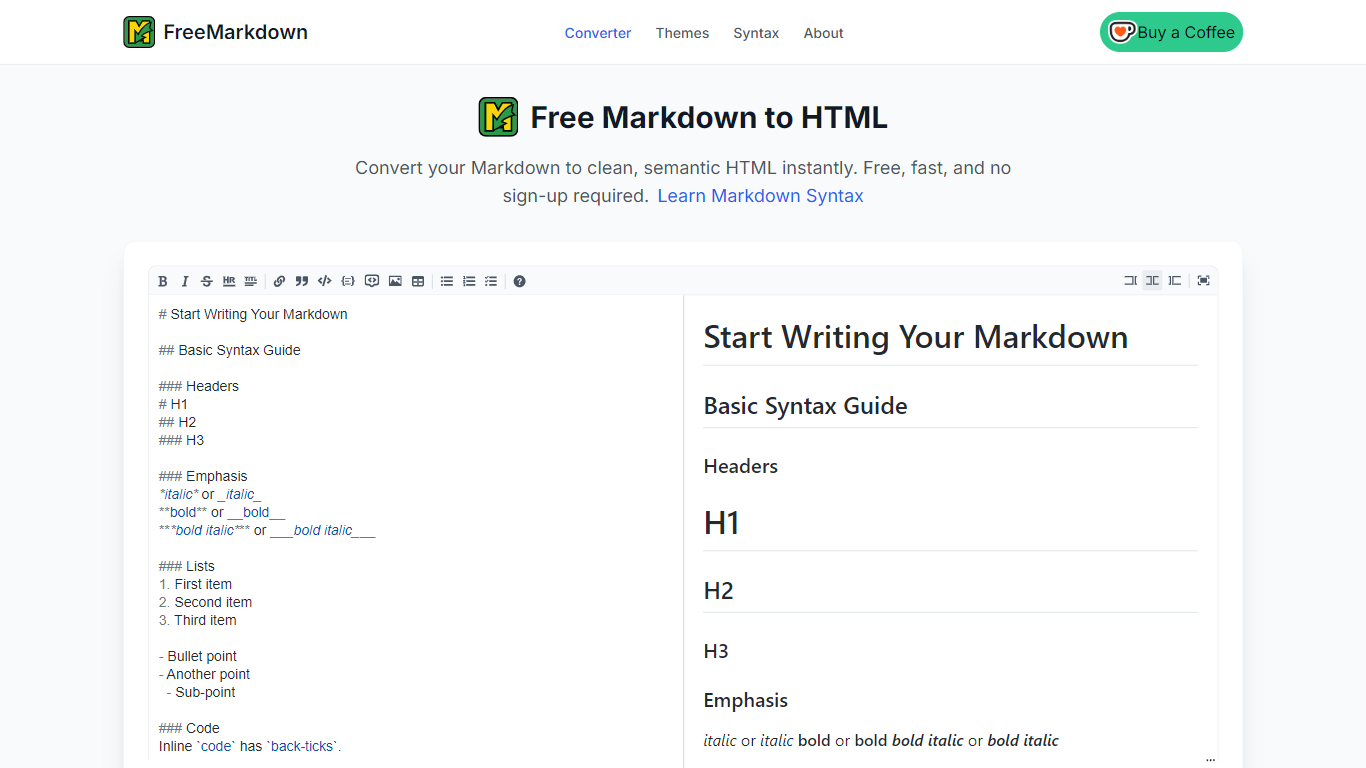
FreeMarkdown on freemarkdown.com is a browser editor that converts Markdown into styled HTML with a live preview, theme picker, and download button. You can paste or upload .md files, switch between HTML and Mind Map views, and export finished output without creating an account.
Many Markdown converters spit out bare HTML with no styling. FreeMarkdown wraps output in one of eight preset themes such as GitHub Style, Notion Style, Nord, and Solarized Light, so README drafts and blog posts look finished before you copy them elsewhere. Version v1.5.12 also added Mind Map mode with SVG, PNG, and HTML exports.
The about page states the tool does not store your content or track usage, and signup is not required. Changelog notes eight preset templates, immersive fullscreen editing, and fixes so exported HTML matches the on-screen preview.
It fits technical writers, bloggers, and developers who need quick Markdown-to-HTML conversion in the browser. Teams that need collaborative editing or PDF export will still want a dedicated docs platform, since PDF and DOCX exports remain on the future roadmap.
Live HTML preview while you type Markdown on the freemarkdown.com editor
Eight preset themes including GitHub Style, Notion Style, Nord, and Solarized Light
Mind Map mode in v1.5.12 exports diagrams as SVG, PNG, or HTML
Upload .md files directly into the editor from the homepage toolbar
Download generated HTML files without registration on the about page
Markdown syntax guide covers headers, tables, task lists, footnotes, and code blocks
Privacy policy on the about page says content is not stored or tracked
No account required and the about page says content is not stored.
Eight visual themes make exported HTML look polished without custom CSS.
Mind Map exports in SVG, PNG, and HTML add a format beyond basic HTML conversion.
PDF and DOCX export remain on the future roadmap in the changelog.
Open-source GitHub repository is still in the planning phase per the about page.
Browser-only tool with no offline mode until the planned PWA support ships.
Is Markdown to HTML free?
Yes. FreeMarkdown on freemarkdown.com is completely free with no registration required according to the about page. There are no usage limits listed for converting Markdown to HTML in the browser.
What can I do with FreeMarkdown?
FreeMarkdown converts Markdown to clean HTML, previews output live, and lets you download HTML files. Version v1.5.12 also adds Mind Map mode with SVG, PNG, and HTML export options from the changelog.
Does FreeMarkdown store my content?
No. The about page states FreeMarkdown does not store your content or track your usage. You can start converting immediately without creating an account.
What themes does FreeMarkdown offer?
FreeMarkdown lists eight preset themes on the template page: Classic Light, Modern Dark, Sepia Reading, GitHub Style, Notion Style, Nord Theme, Minimal White, and Solarized Light.
What Markdown syntax is supported?
The syntax guide on freemarkdown.com covers headers, bold and italic text, ordered and unordered lists, links, images, code blocks, tables, blockquotes, task lists, and footnotes.
Can I export Mind Maps from FreeMarkdown?
Yes. Markdown to HTML via FreeMarkdown added Mind Map mode in v1.5.12 with SVG, PNG, and HTML export options. Switch to Mind view from the freemarkdown.com editor toolbar to use it.
How do I contact FreeMarkdown support?
Email [email protected] for questions or suggestions. The about page also mentions a planned open-source GitHub repository, though it notes the repo is still in the planning phase.