
Last updated 08-10-2026
Category:
Reviews:
Join thousands of AI enthusiasts in the World of AI!
QR Code AI Art Generator - Hugging Face
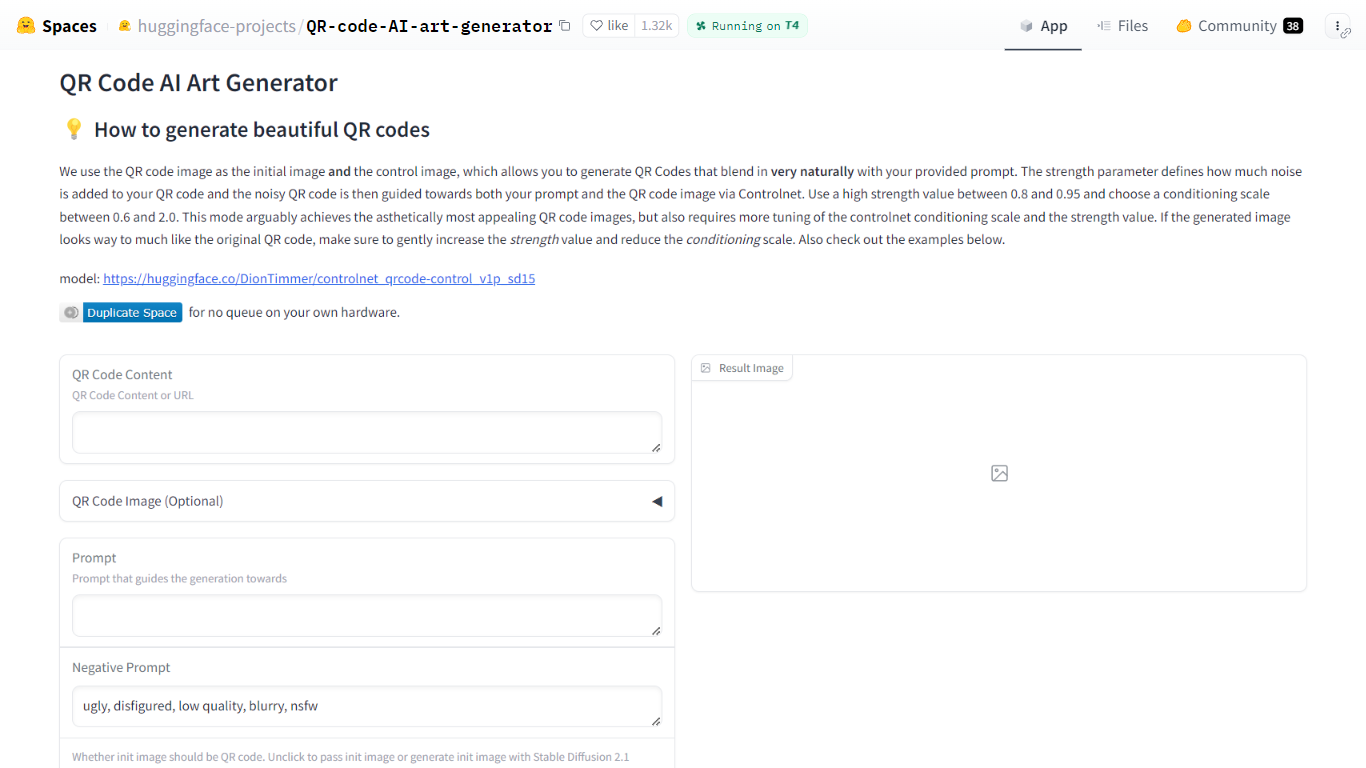
QR Code AI Art Generator is a free Hugging Face Space that turns scannable QR codes into styled artwork. You enter a URL or other QR payload, add a text prompt, and the Gradio app returns an image that still scans while matching your visual theme. It sits in the design and image generation category for anyone who needs branded codes rather than plain black-and-white squares.
Most QR stylizers treat the code as a loose overlay. This Space feeds the QR image as both the starting canvas and the ControlNet control image, so structure and style are guided together. Hugging Face recommends strength between 0.8 and 0.95 and a ControlNet conditioning scale between 0.6 and 2.0, which is more tuning than one-click generators but usually yields codes that blend into photos, illustrations, or posters.
It fits marketers, event teams, and designers who want campaign-ready QR art without running Stable Diffusion locally. The interface also accepts an uploaded QR image, optional init images, negative prompts, sampler choice, and seed control, with example presets on the page for quick starting points.
Uses DionTimmer/controlnet_qrcode-control_v1p_sd15 ControlNet model for SD 1.5
QR image serves as both init image and ControlNet control for tighter structure
Recommended strength range 0.8 to 0.95 with conditioning scale 0.6 to 2.0
Accepts URL or text payload, or upload your own QR code image
Built-in example table with guidance scale, strength, seed, and sampler presets
Duplicate the Space to run without the public queue on your own hardware
Dual use of the QR image as init and control keeps codes more scannable than loose overlays
Example presets on the page show working parameter combinations
Supports uploaded QR images plus optional custom init images
Free to use in the public Hugging Face Space without installing local SD stacks
Public Space queue can slow generation during busy periods
Scan reliability still needs manual tuning of strength and conditioning scale
Runs on Stable Diffusion 1.5 by default while the linked model card notes SD 2.1 can be marginally stronger
Is QR Code AI Art Generator free?
Yes. QR Code AI Art Generator - Hugging Face runs as a public Hugging Face Space with no listed subscription or credit requirement on the app page. You open the Space in a browser and generate images through the Gradio interface.
What model does QR Code AI Art Generator use?
QR Code AI Art Generator - Hugging Face uses the DionTimmer/controlnet_qrcode-control_v1p_sd15 ControlNet checkpoint for Stable Diffusion 1.5. The Space page links to that model card, which also documents a Stable Diffusion 2.1 variant for slightly stronger results.
How do I make QR Code AI Art Generator scans work?
QR Code AI Art Generator - Hugging Face balances scan reliability with style through strength and ControlNet conditioning scale. If the output looks too much like the raw QR pattern, increase strength slightly and lower the conditioning scale, following the guidance on the Space page.
Can I upload my own QR code to QR Code AI Art Generator?
Yes. QR Code AI Art Generator - Hugging Face lets you paste QR content or a URL, or upload an existing QR image instead of auto-generating one. You can also supply an optional init image or let the app generate one with Stable Diffusion 2.1.
Does QR Code AI Art Generator need a Hugging Face account?
No account is required to try QR Code AI Art Generator - Hugging Face in the public Space queue. Hugging Face notes you can duplicate the Space to your account if you want faster runs on your own hardware without waiting in the shared queue.
What parameters does QR Code AI Art Generator expose?
QR Code AI Art Generator - Hugging Face exposes ControlNet conditioning scale, strength, guidance scale, sampler, seed, prompt, negative prompt, and a toggle for using the QR code as the init image. The page includes a results table showing sample values such as guidance scale 7.5 and strength 0.9.